
Module Builder includes several additional features that help you manage, extend, and customize your custom modules more efficiently.
These features are useful when you want to reuse created modules, improve module presentation, or connect modules together inside your CRM.
Export Module
The Export Module feature allows you to export a custom module created with Module Builder. This is useful if you want to move the module to another CRM installation, create a backup of the module structure, or prepare the module for further use.
- Select the module you want to export.
- Click the Export Module button. The module will be downloaded as a ZIP file.

Icons for Custom Modules
Module Builder allows you to define icons for your custom modules. Custom icons make modules easier to recognize in the CRM menu and improve the overall user experience.
You can choose an icon that best represents the purpose of the module, making the CRM interface clearer and more organized for users.
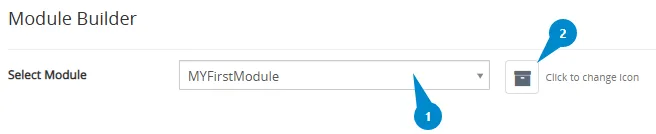
- Select the module from the list.
- Click the icon next to the module to change it.
- Choose the new icon and confirm the change using the Save button.
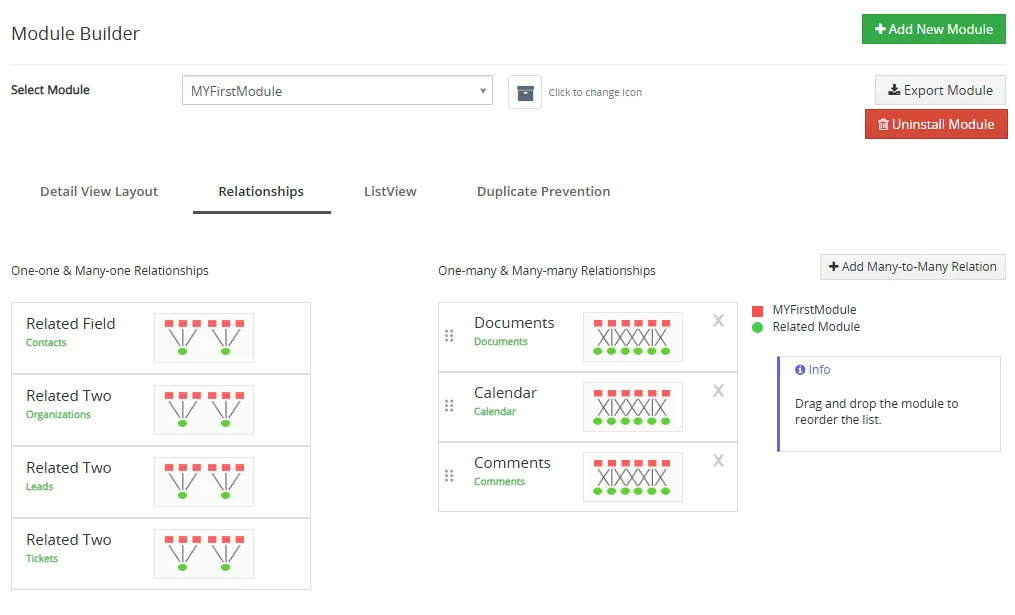
Relations between modules
Module Builder supports creating relations between modules. This allows you to connect records from different modules and build a more complete CRM data structure.
Relations are useful when your custom module needs to be linked with another module, for example when one record should be connected with related records from another part of the CRM.
You can create relations between custom modules or connect a custom module with existing CRM modules. This helps users work with related data directly from the module detail view.
Need help with Module Builder?
Our support team answers questions about installation, templates and settings.