
Hotel Booking
for Vtiger CRM
Manage hotels, rooms and reservations directly in your CRM. Give your team a clear booking calendar, organised room details and a simple way to create and update each reservation.
Also included in the All Access Package.
Hotel booking features inside your CRM
Manage your properties and daily reservations from one place.
Visual booking calendar
See hotel reservations together on one screen and navigate between dates, hotels and rooms.
Hotels in your CRM
Create hotel records with the Hotels module and organise the properties your team manages.
Room configuration
Set up room types, nightly rates, maximum occupancy and the services associated with each room.
Reservation updates
Open a booking from the calendar, change its stage or continue to the full reservation record.
PDF Maker compatibility
Combine Hotel Booking with PDF Maker when preparing documents for your reservation workflow.
Email Maker compatibility
Use Hotel Booking alongside Email Maker to support your reservation communication in the same CRM.
See Hotel Booking in action
Explore the calendar, reservations, hotels and room setup.
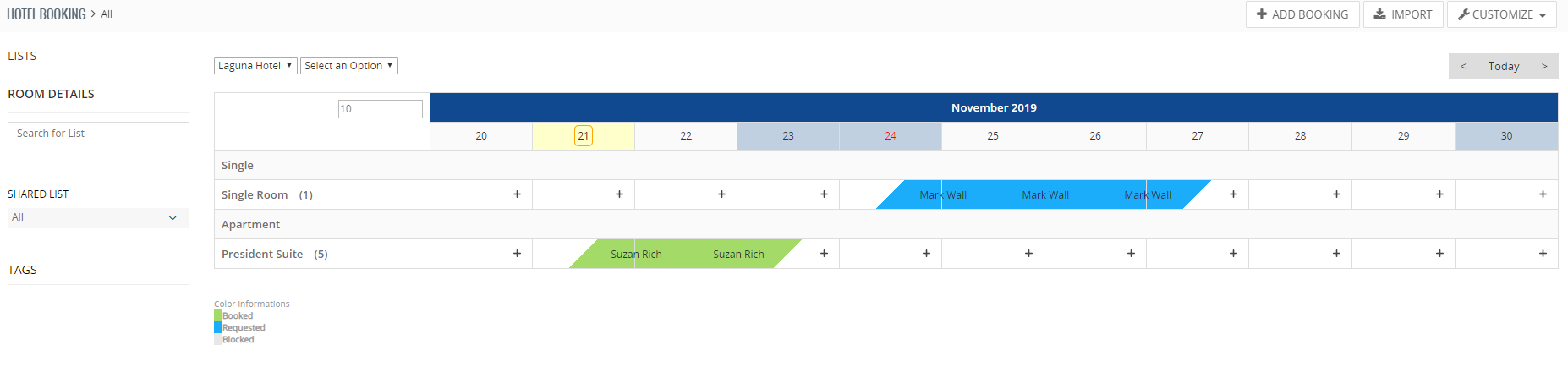
Review room reservations in one calendar.
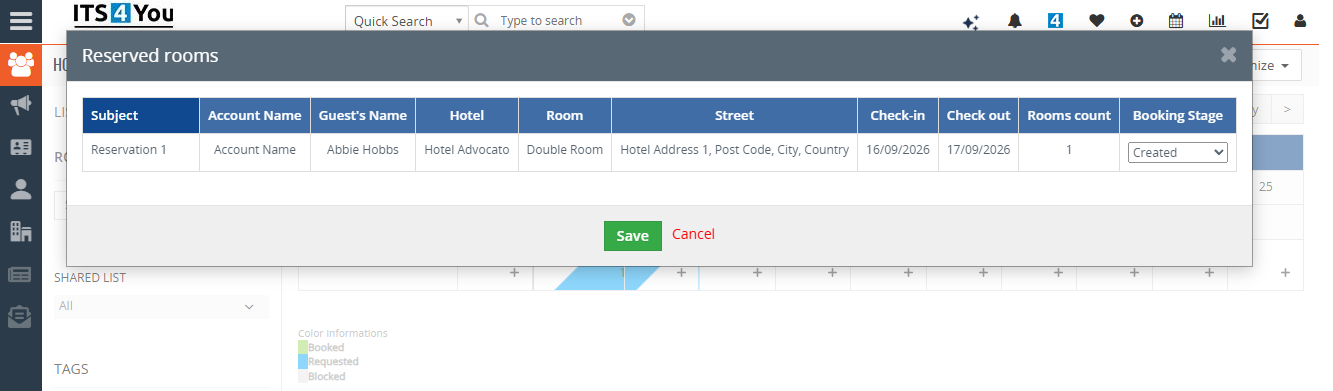
Open a reservation to review its details and booking stage.
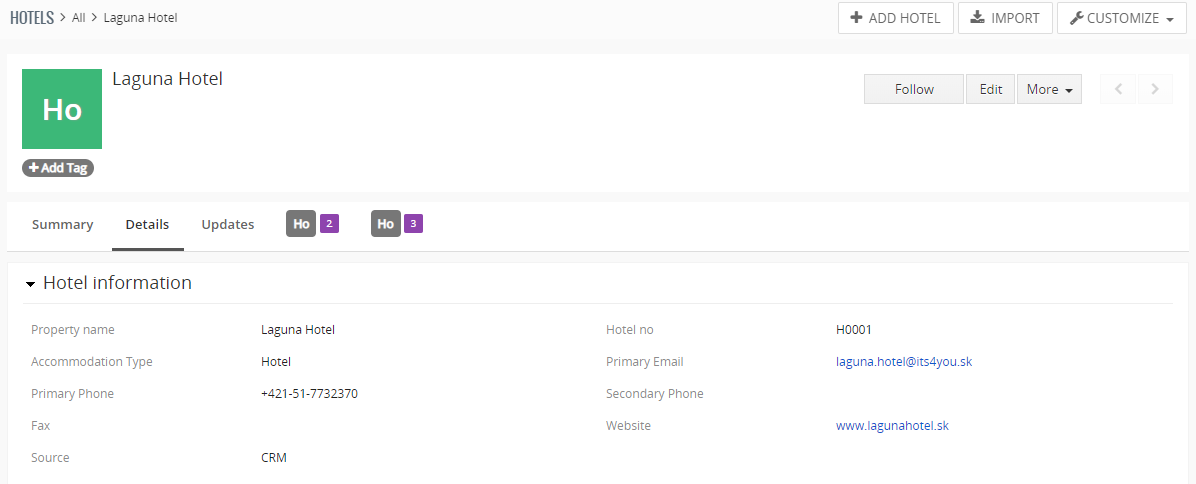
Use the Hotels module to create the properties you manage.
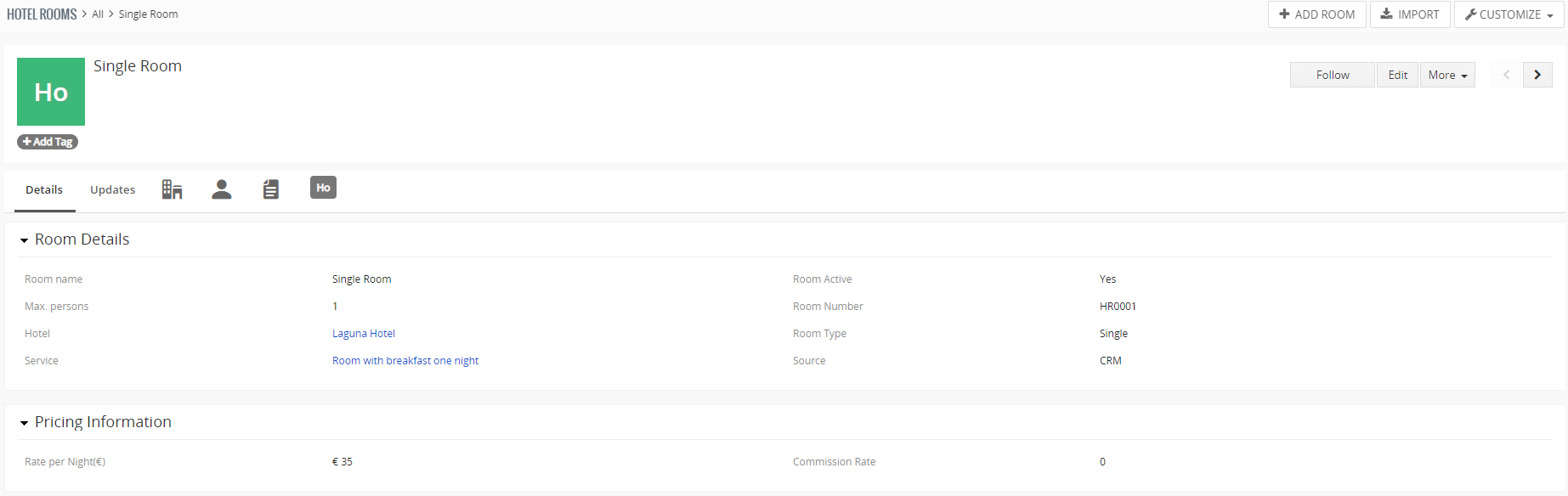
Define room details and connect each room to a hotel and service.
A clearer way to manage reservations
Support everyday reservation work across your accommodation business.
Independent hotels
Keep room configuration and daily reservations together. Reception staff can review the calendar and open the booking they need.
Guesthouses and B&Bs
Create rooms and link an accommodation service, such as a room for one night with breakfast, before recording reservations.
Teams managing several hotels
Create separate hotel records and switch the calendar view to the property or rooms you want to review.
Booking follow up
When a guest contacts your team, locate the reservation in the calendar, review its details and update the booking stage.
How to use Hotel Booking
Set up your hotels and rooms, then create your first reservation.
Install and validate the extension using the free ITS4YOU Installer. After installation, look for Hotel Booking under Inventory, and Hotels and Hotel Rooms under Sales. Menu placement may differ if your CRM navigation has been customised.
Create your hotel
Open Hotels and select Add Hotel. Enter the required hotel information and save the record. Create a record for each hotel you want to manage.
Create the accommodation service
Go to Inventory → Services and select Add Service. Create the service you will associate with a room, for example Room for one night with breakfast.
Create your hotel rooms
Open Hotel Rooms and select Add Room. Complete the required fields, including Room Type, Hotel and Service. Configure the room details, such as its nightly rate and maximum number of guests, then save.
Create a reservation in the calendar
Open Inventory → Hotel Booking. In the calendar, locate the room and date you need, then click the + button to create a reservation. Complete the booking information and save it. The reservation appears in the calendar.

Reservations in the calendar. Review and update a reservation
Click the reservation name in the calendar to open its booking panel. From there, you can change the booking stage. Click the subject to open the full reservation detail view.
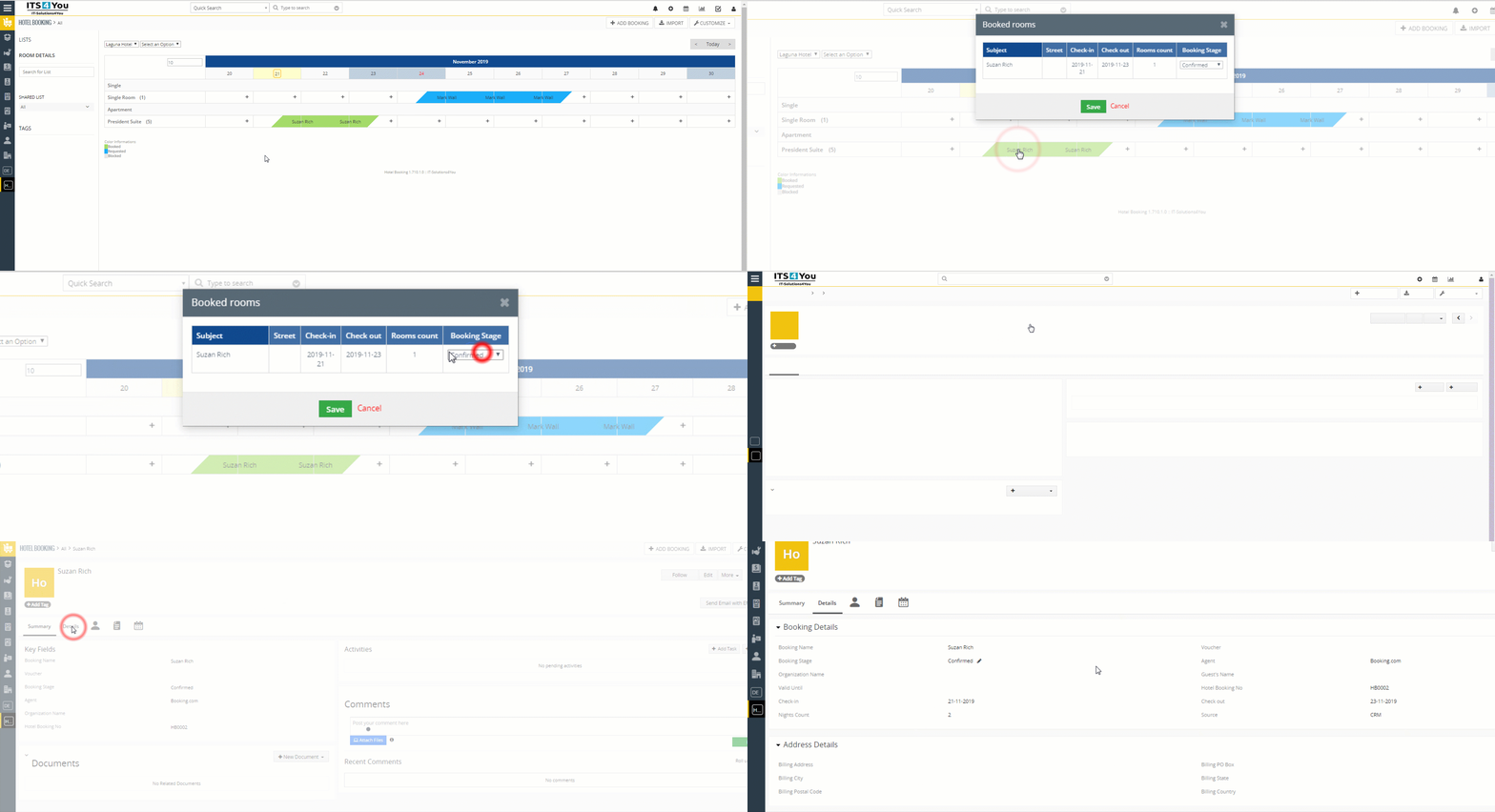
Open and update a reservation. Select the image to view the animation in full size.
Connect bookings with documents and emails
Use PDF Maker and Email Maker with your reservation workflow.
PDF Maker
Prepare reusable PDF templates for your booking workflow. Configure the layout and available fields to suit the reservation documents you want to produce.
Explore PDF Maker ›Email Maker
Prepare reusable email templates for guest communication. Keep the wording consistent while adapting each message to the reservation.
Explore Email Maker ›Hotel Booking, PDF Maker and Email Maker are all included in the All Access Package.
Hotel Booking FAQ
Find answers about setup, compatibility and subscription options.
Which Vtiger versions are supported?
Hotel Booking supports Vtiger CRM 7.x and 8.x. If your CRM includes custom changes, contact us with your exact version and requirements before installation.
What is included in the booking workflow?
The extension provides Hotel Booking, Hotels and Hotel Rooms modules. Create your hotels, prepare accommodation services, configure rooms and then manage reservations in the calendar.
Can I manage more than one hotel?
Yes. Create separate hotel records and associate rooms with the relevant hotel. You can switch between hotels and rooms to review their bookings.
Can I change a reservation from the calendar?
Yes. Click a reservation name to open its booking panel and change the booking stage. Click its subject to open the complete reservation detail view.
How much does Hotel Booking cost?
The standalone subscription costs 11.90 € per month or 119 € per year. You can also access the extension through the All Access Package.
Is Hotel Booking included in All Access?
Yes. Hotel Booking is included in the All Access Package, together with PDF Maker, Email Maker and other ITS4YOU extensions.
Does it work with PDF Maker and Email Maker?
Yes. Hotel Booking is compatible with both extensions. Templates need to be configured for the documents and emails you want to use.
Where can I find the user guide?
The How to use section on this page covers hotel creation, services, room setup, creating a reservation and updating it from the calendar. If you need help with your own setup, contact our team.
Need help with Hotel Booking?
Tell us how you manage your hotels and rooms, which Vtiger version you use and what you want to achieve. We can help with installation, configuration and questions about your reservation workflow.
Start using Hotel Booking now
Bring hotel and room reservation management into your Vtiger CRM.
Need more extensions? Hotel Booking is also included in the All Access Package.
Explore All Vtiger Extensions
Discover more tools for your everyday CRM work.