
Email Marketing
for Vtiger CRM
Create and schedule email campaigns from Vtiger CRM. Select CRM recipients, use Newsletter or EMAILMaker templates with custom functions, then review campaign progress and results.
Included from: Extended Package
See your campaign results in Vtiger CRM
The campaign summary brings key fields, sending progress and engagement metrics together in one view.
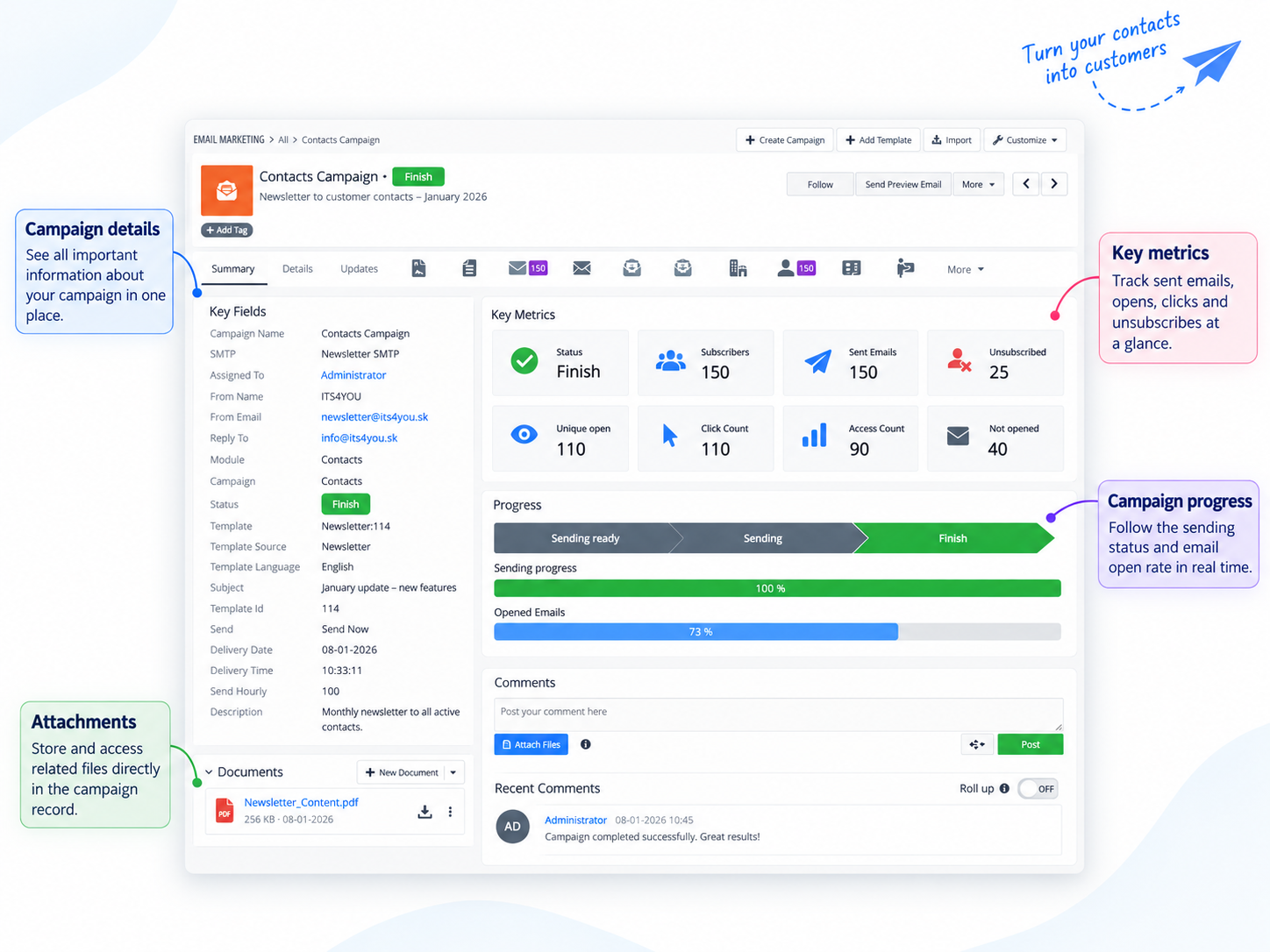
Email campaigns connected to your CRM
Use customer and prospect records already in Vtiger to prepare relevant communications and manage campaign delivery.
Create campaigns from CRM data
Select supported CRM records and email fields to build a recipient list for your campaign.
Use templates with custom functions
Build campaigns with Newsletter templates or EMAILMaker templates, including custom functions.
Personalize your message
Include CRM information in campaign content to make each email more relevant to its recipient.
Schedule campaign sending
Set a delivery date, time and sending mode for campaigns that are ready to go.
Review campaign activity
See delivery progress and available engagement metrics, including opens and clicks when tracking is permitted.
Give recipients an opt out
Support unsubscribe handling so opted out recipients are excluded from campaign delivery.
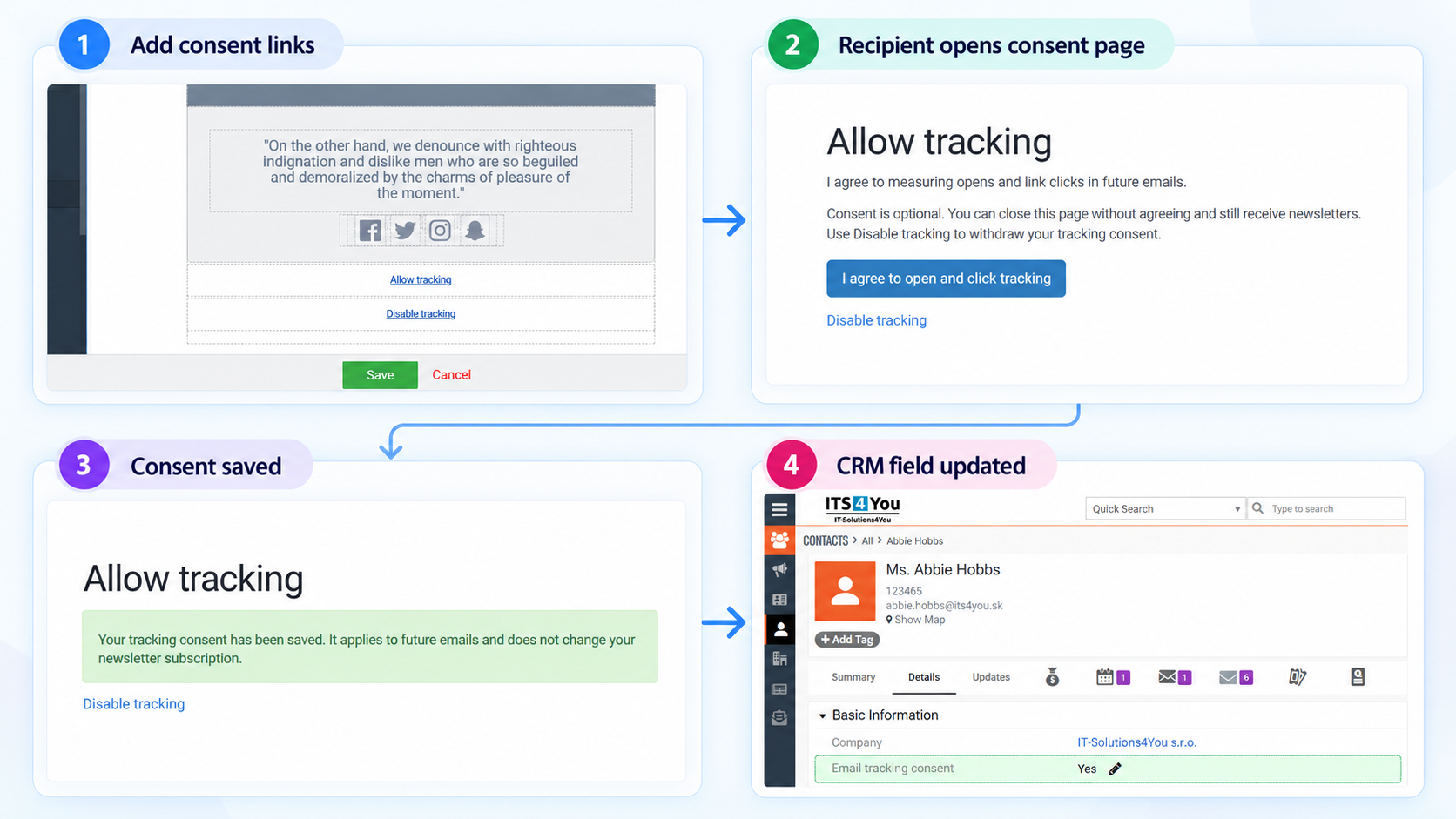
The workflow shows how recipients can allow or disable tracking and how their tracking consent is recorded in Vtiger CRM.
Email Marketing use cases
Use Vtiger CRM data to send timely and relevant campaign messages to customers and prospects.
Product and company news
Share product updates, service announcements and company news with selected CRM audiences.
Event invitations
Invite contacts to webinars, product demonstrations, training sessions and business events.
Customer follow up
Prepare follow up messages for customers and prospects using CRM records and email templates.
A straightforward campaign workflow
Prepare a message, choose its audience and schedule delivery from Email Marketing.
Set campaign details
Add sender details and choose the CRM recipient module.
Choose recipients
Load eligible records and select the appropriate email field.
Select a template
Choose a Newsletter or EMAILMaker template and review the content.
Schedule and review
Choose sending options, then monitor campaign status and results.
From recipient selection to campaign results
Email Marketing brings the essential campaign steps into your Vtiger CRM workflow.
- Select the audience
Choose supported CRM records and the email field for the campaign. - Prepare the email
Choose a template, language and message content, then review a preview. - Schedule and monitor
Set the sending schedule and follow status, delivery and activity metrics.
Campaign progress
Included from Extended Package
Email Marketing is included in the Extended Package and All Access Package. It is also available separately with monthly or yearly billing. Newsletter is included with Email Marketing.
Compare packagesImportant setup and sending notes
Scheduler: To use scheduled campaign sending, make sure your Vtiger Scheduler (Cronjob) is working.
Daily sending capacity: The number of emails sent per day depends on your Vtiger Outgoing Server.
Templates: Use Newsletter and EMAILMaker templates. EMAILMaker custom functions are supported.
Supported modules: Email Marketing works with Newsletter and EMAILMaker modules.
Email Marketing documentation
See how to prepare campaigns, select recipients and templates, review delivery metrics and configure Tracking Consent.
Open the Email Marketing user guidePricing for Vtiger Email Marketing
Get Email Marketing with Newsletter included.
Monthly license
Flexible monthly billing for Email Marketing.
Buy monthlyYearly license
Annual access to Email Marketing.
Buy yearlyFrequently asked questions
Key details about Email Marketing for Vtiger CRM.
Is Newsletter included with Email Marketing?
Yes. Newsletter is included with Email Marketing, so there is no need to purchase it separately.
What is needed for scheduled campaigns?
Your Vtiger Scheduler (Cronjob) needs to be working for scheduled campaign sending.
How many emails can be sent each day?
The daily sending volume depends on the configuration and limits of your Vtiger Outgoing Server.
Does lack of tracking consent block email delivery?
No. A recipient without tracking consent can still receive an email. Its opens and clicks are not tracked.
Is tracking consent the same as unsubscribe?
No. Tracking consent controls measurement. Unsubscribe controls delivery and opted out recipients are excluded from sending.
Can I use EMAILMaker templates and custom functions?
Yes. Email Marketing supports EMAILMaker templates, including custom functions, as well as Newsletter templates.
Where can I find setup instructions?
See the Email Marketing user guide for installation and usage instructions.
Which packages include Email Marketing?
Email Marketing is included in the Extended Package and All Access Package.
How does Tracking Consent relate to European and French requirements?
Organizations communicating in Europe or France should assess applicable privacy requirements and CNIL guidance.
Have questions before purchase?
Contact us if you need help choosing a license, checking package availability or confirming how Email Marketing fits your Vtiger CRM workflow.
- Help with monthly and yearly licenses
- Information about Newsletter and EMAILMaker
- Guidance about compatibility and campaign tracking consent
Contact us
Start using Email Marketing
Create and manage Vtiger CRM campaigns with Newsletter or EMAILMaker templates.
Explore all Vtiger extensions
Browse more tools for email templates, reporting, automation, AI features and CRM customization.