
AI Assistant for Vtiger CRM
Create reusable AI assistants with your instructions, your CRM context and a consistent response style.
Give sales, support and finance their own assistants. Choose the module, permitted fields and related records, then let your team reuse the configuration in everyday CRM conversations.
Available now from €29 per month. AI Chat included.
- Available now
- Vtiger Open Source 7.4 / 7.5 / 8.x
- OpenAI API integration
Use your own OpenAI API key. AI Chat is included at no additional charge.
Configure once. Reuse across your CRM.
Turn repeated instructions into assistants your team can select whenever they need them.
Assistants per module
Create configurations for Organizations, Contacts, Opportunities, Tickets or other available modules. Users see the assistants for their current module.
Custom instructions
Define the task, priorities and handling of missing information. Build reusable prompts without writing code.
Allowed CRM fields
Select the source fields and related data the assistant may use. Existing CRM user permissions still apply.
Model and language
Choose an available OpenAI model and a fixed response language, or let the language follow the user's request.
Consistent output
Set the structure, tone and response length. Reuse the same format for summaries, reviews and suggested next steps.
A default per module
Set one active default assistant for new conversations in each module. Existing chats keep their previous selection.
Assistants follow your current module
AI Chat loads the configured assistants for the CRM module you are currently using. For example, assistants assigned to Organizations become available when you open the Organizations module.
If the current module has no configured assistants, you use standard AI Chat. The same applies when you open AI Chat through the icon in the top corner while you are on the Dashboard.
Give every assistant the right CRM context
Choose the information needed for its task, including permitted data from related modules.
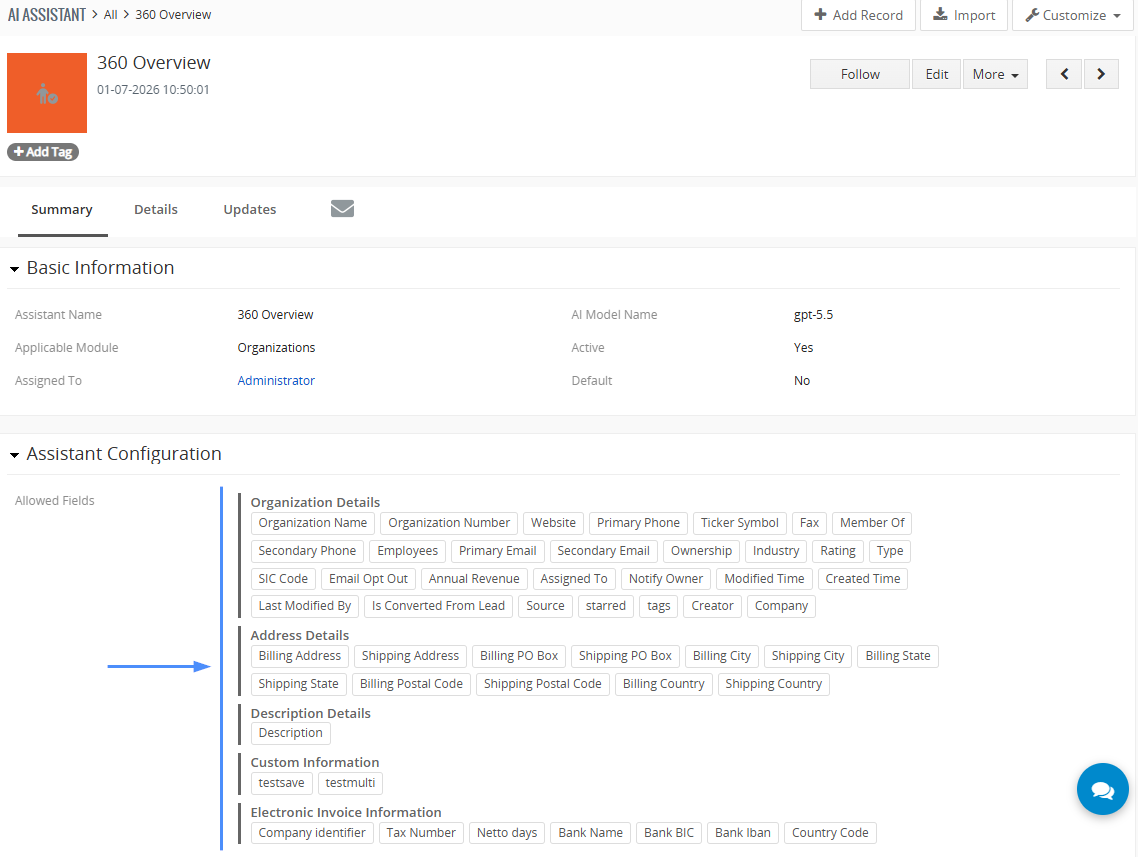
Choose fields and relationships
- Select allowed fields from the assistant's applicable module.
- Add related modules and choose their specific fields.
- Set a time window and a limit for detailed related records.
- Include supported product and service data through the LineItems group.
Permissions still apply. Selecting a module does not automatically include all its fields. Instructions cannot make excluded data available.
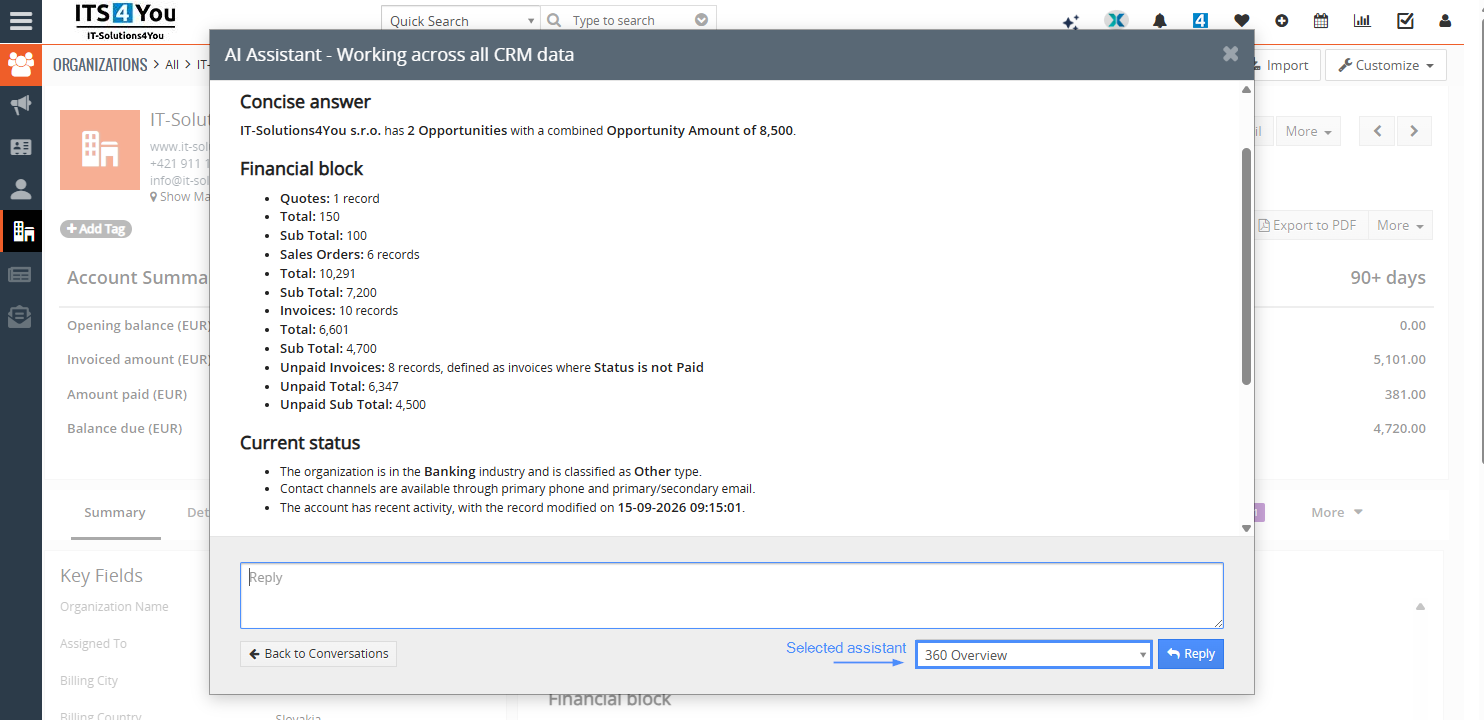
360 Overview
Module: Organizations
Source fields: Name, industry and description
Related context: Selected Opportunities, Quotes, Sales Orders and Invoice fields
Useful output: Relationship summary, open opportunities, unpaid invoices and suggested next steps
Available modules, fields and results depend on your installation and permissions.
Build prompts your team can reuse
Keep the task instructions and response format in one assistant configuration.
Your CRM prompt builder
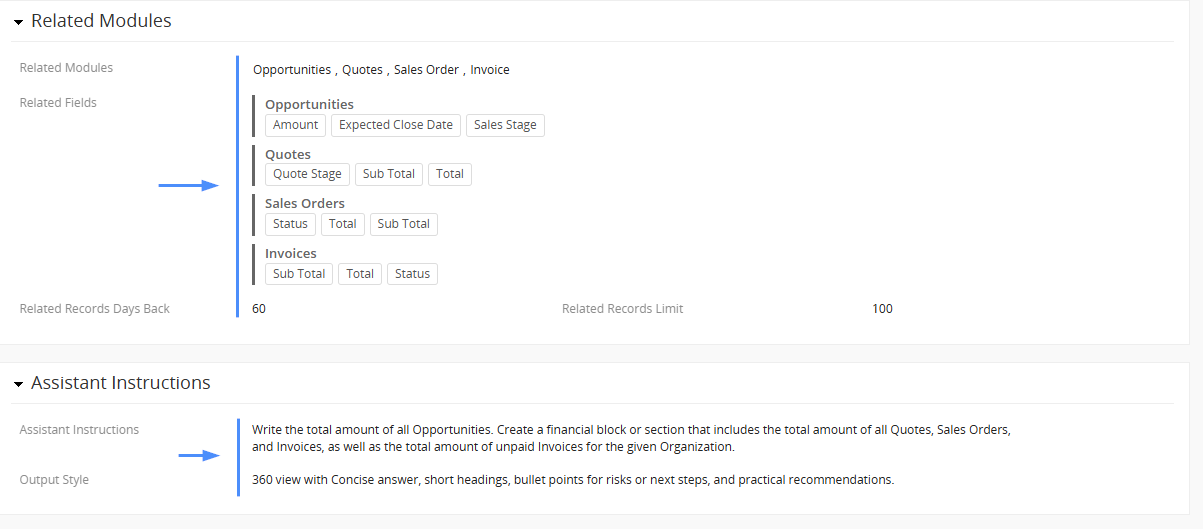
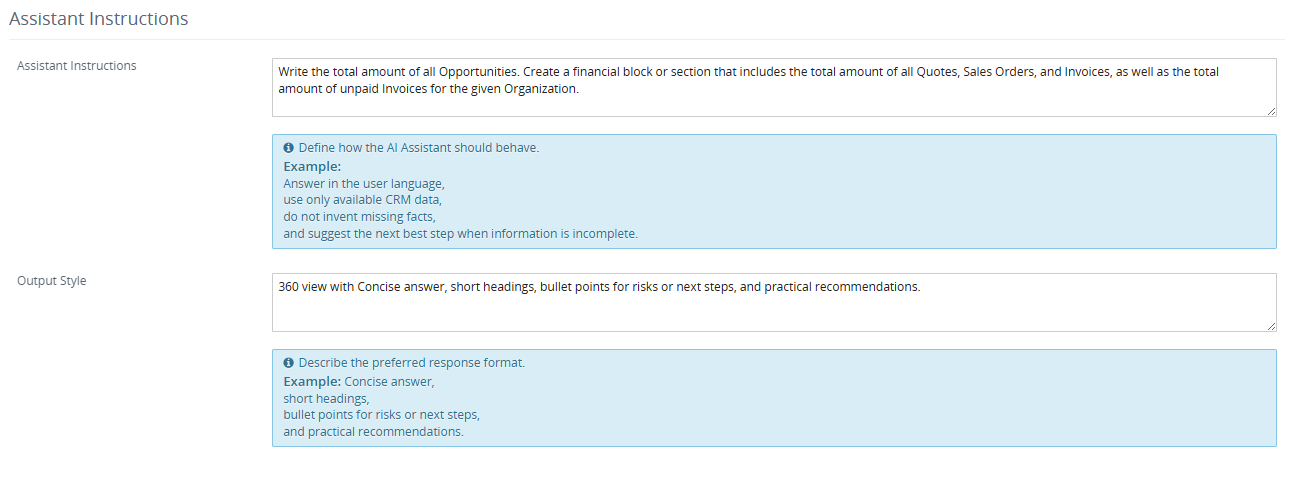
Use Assistant Instructions to explain what matters. Use Output Style to define how the answer should look. Your team can then submit short requests without repeating the full brief.
This brings generative AI into your existing Open Source CRM with a consistent approach to customer reviews, support replies and record summaries.
Language control: a fixed Response Language takes precedence over language instructions in the prompt or output style.
Prepare a customer overview from permitted CRM data. Focus on open opportunities and unpaid invoices. Explain missing information and distinguish facts from recommendations.
Output style
Use Summary, Key Facts and Next Steps. Keep the response concise. Include currency with financial amounts and suggest no more than three next steps.
User request
Prepare an overview of this organization.
One extension, different team needs
Configure focused assistants for the work your users already do in Vtiger.
Customer reviews
Combine permitted organization data with related contacts, opportunities and invoices before a customer conversation.
“Summarize this customer and suggest three next steps.”
Opportunity assessment
Review the recorded stage, amount, probability and closing date to identify questions worth following up.
“Review this opportunity and explain the risks visible in its CRM data.”
Support replies
Use the ticket subject, description, priority and permitted comments to prepare a response in your team's style.
“Summarize this issue and draft a concise customer reply.”
Invoice reviews
Explain available due dates, payment status and balances. Include line items when they are relevant and permitted.
“Summarize this invoice and highlight any missing information.”
Create CRM records from a prompt
Turn a request into a quote linked to an organization, with products selected from your CRM and a preview before creation.
Included with AI Assistant. This record creation workflow is part of the AI Assistant extension. You do not need AI Agent. AI prepares the proposal, and you review and confirm the record before it is created.
Describe the quote you need
Enter a prompt identifying the organization, the products to include and the requested pricing. In this example, the assistant prepares a quote for IT-Solutions4You s.r.o. using products from the Hardware category.
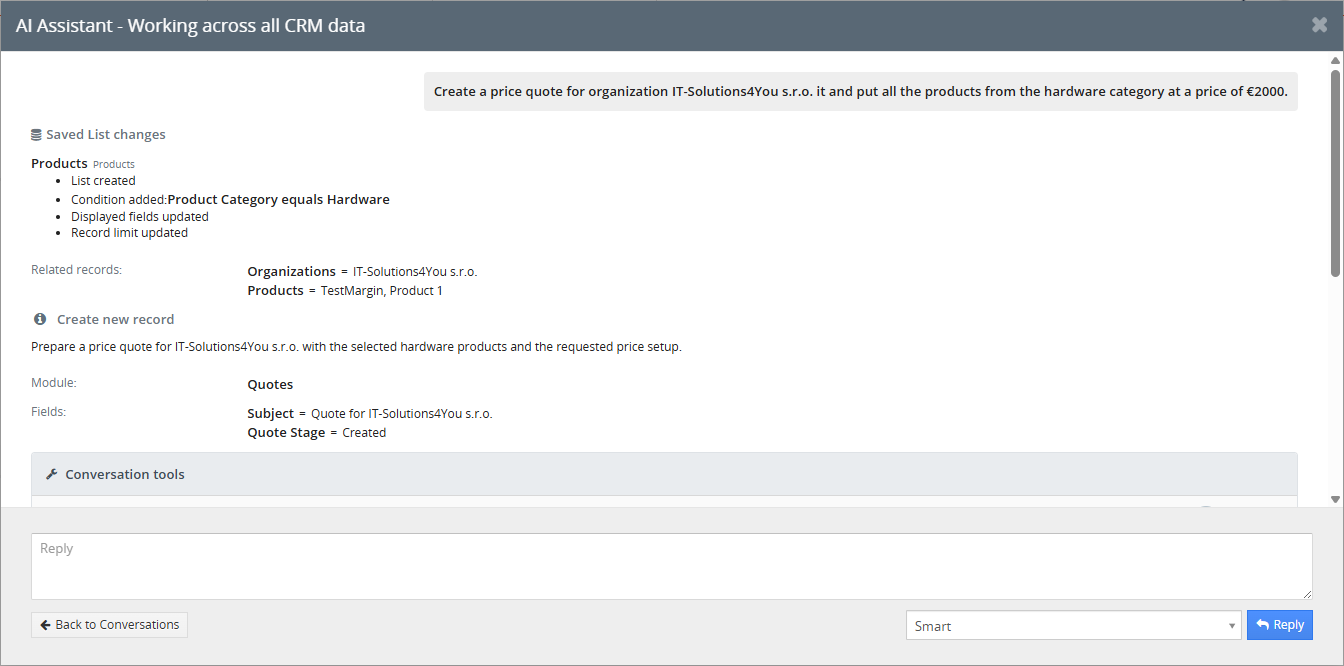
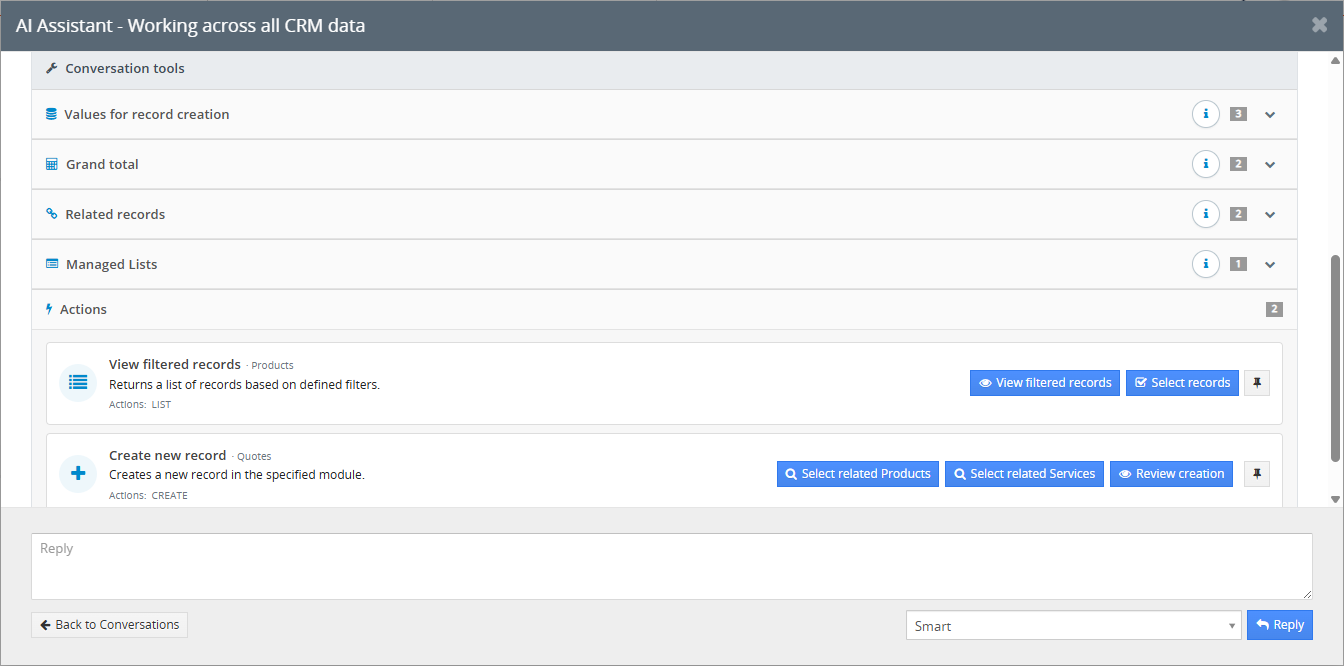
Inspect the Conversation tools
Open Conversation tools to inspect the values for record creation, the proposed grand total, related records, managed lists and available actions before creating the quote.
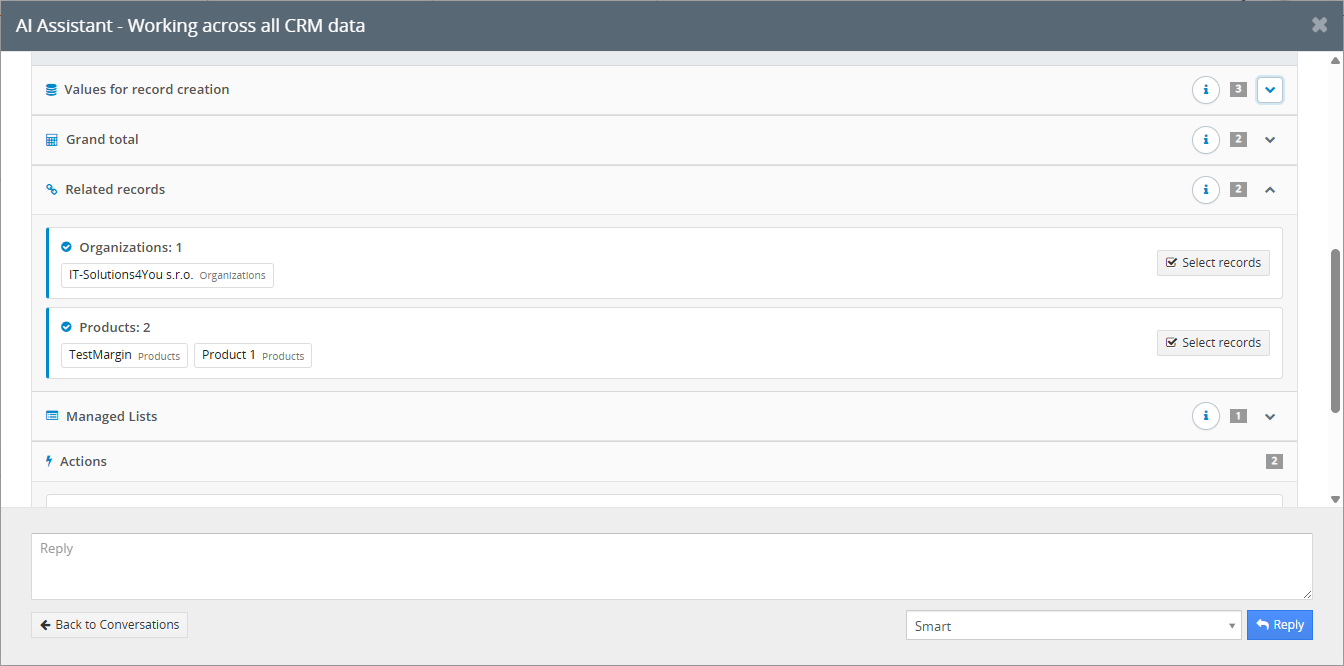
Check the organization and products
Expand Related records to check which organization and products were selected from your prompt. Here, the organization is linked together with the matching products from the Hardware category.
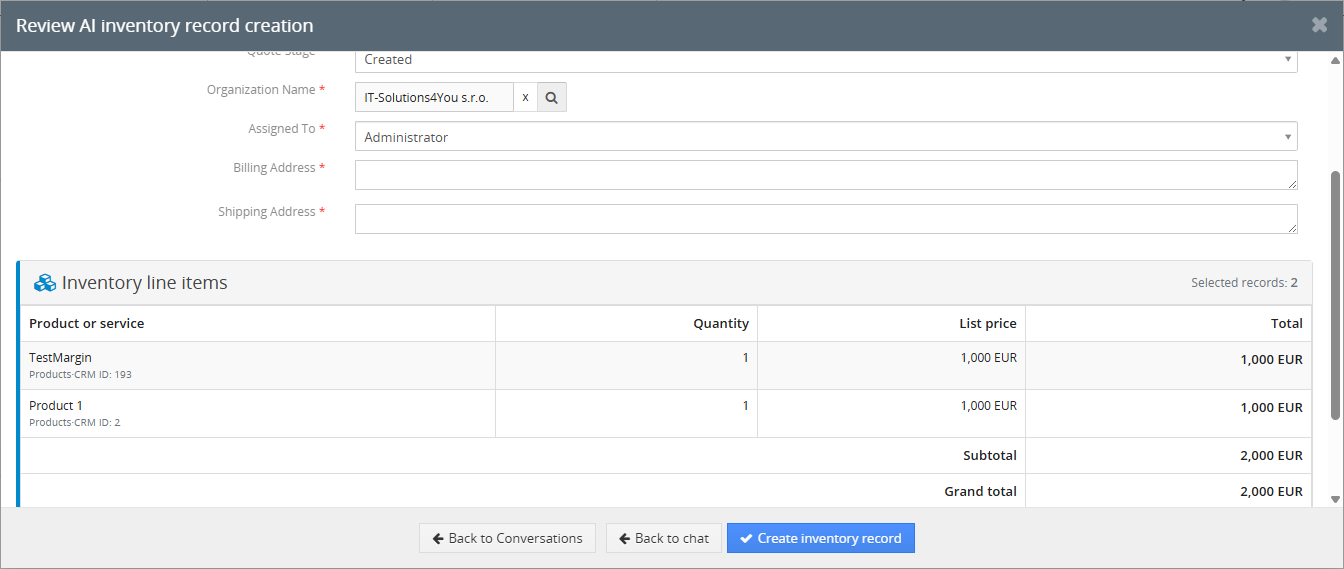
Review and confirm the quote
Choose Review creation to open the preview. Check the quote fields, linked organization, line items, quantities, prices and total. Complete any required information, then select Create inventory record to confirm creation.
For detailed explanations of all actions, Conversation tools and interface elements shown in these screenshots, see the extension documentation.
From configuration to a useful answer
Administrators prepare the assistants. Users select them in AI Chat and submit their requests.
Install and connect
Activate AI Chat and AI Assistant through Installer. Configure a working OpenAI API key in the AI settings.
Configure the assistant
Choose its module, model, allowed fields, related context, instructions and output style. Save it as active.
Use and review
Open the relevant module and record, select an available assistant and submit a request. Review its answer and confirm any supported record changes.
You control saved changes. Creating an assistant does not start automatic processing. Requests run through AI Chat. Generating a response does not save a record or send an email.
Simple pricing for AI Assistant
Choose monthly or yearly billing. AI Chat is included with both options.
AI Assistant
Reusable assistants, custom instructions, permitted CRM context, model selection, response settings and record creation with a review before confirmation.
AI Chat included at no extra charge.
For Vtiger Open Source 7.4, 7.5 and 8.x.
A working OpenAI API key is required.
Manage API usage and available credit in your OpenAI account.
Compare all Vtiger AI levels
AI Assistant FAQ
Compatibility, setup, data access and everyday use.
Why do I see different assistants in different modules?
AI Chat loads assistants according to the CRM module you are using. An assistant configured for Organizations becomes available in Organizations. If your current module has no configured assistants, standard AI Chat remains available. You also use standard AI Chat when opening it through the icon in the top corner from the Dashboard.
Do I need AI Agent to create a quote?
No. The quote creation workflow shown on this page is included with the AI Assistant extension. Submit your prompt, inspect the Conversation tools and selected related records, then open Review creation. The quote is created only after you confirm with Create inventory record and the required information passes validation. CRM permissions still apply. AI Agent is a separate level currently in development.
What does AI Assistant add to AI Chat?
AI Assistant stores reusable configurations for specific CRM modules, including instructions, model, language, permitted fields and output style. AI Chat provides the conversation interface and processes requests using the selected assistant. AI Assistant includes the base AI Chat level at no additional charge.
Which Vtiger versions are supported?
The extension supports Vtiger CRM Open Source 7.4, 7.5 and 8.x. Vtiger 7.4 is the minimum supported version. Contact IT-Solutions4You to confirm compatibility if your installation includes custom modules or changes to the standard CRM.
Do I need to purchase and install AI Chat separately?
You do not need a separate AI Chat purchase. It is included in the €29 monthly or €290 yearly AI Assistant subscription. Both AI Chat and AI Assistant must be installed, enabled and activated for configured assistants to work.
Which AI provider is supported, and do I need an API key?
Only the OpenAI API is currently supported. An administrator configures a valid OpenAI API key in the base AI extension. The key is shared across the CRM installation, so there is no separate key for each assistant. Your OpenAI account must have working API access and available usage credit.
Can I set a default Vtiger AI assistant per module?
Yes. Each applicable module can have one active default assistant for new conversations. Setting another assistant as the default clears the previous default flag. Existing conversations retain their most recently used available assistant or standalone model.
How do allowed fields control the data sent to OpenAI?
Allowed Fields, Related Modules and Related Fields define the CRM context the assistant may use. Current user permissions still apply. A configured assistant uses this scope automatically when processing a request, without the separate current record field confirmation used in regular chat with a standalone model.
OpenAI processes the request and included context externally. Field selection controls which CRM data is provided; it does not mean processing stays inside your CRM. Previously shared context can remain in an existing conversation, so start a new conversation when testing a reduced data scope.
Can the assistant create or update CRM records automatically?
Supported record creations and updates require your confirmation. Generating a response or opening a preview does not save changes. With the required modules and permissions, AI can prepare records, meetings, calls and supported documents for review. Calendar task creation is not supported by this feature.
An assistant's action setting is a fallback, not a permission restriction. Create and edit rights remain controlled by CRM permissions. Saving confirmed changes can also trigger your existing CRM automations.
Can I choose the response language and formatting?
Yes. Set a fixed Response Language or use Automatic to follow the latest user request. A fixed language takes precedence over language instructions elsewhere. Use Output Style to specify sections, length and tone, and Assistant Instructions to define the task and priorities.
Why might related records be missing from a response?
Check the selected related modules, their permitted fields, CRM relationships, user permissions, time window and record limit. For ordinary related records, Days Back uses the last modification time, not the invoice due date or opportunity closing date. Specify the intended date field in your request and include it in the permitted fields.
Is this an official Vtiger or OpenAI product?
No. AI Assistant is an independent extension developed by IT-Solutions4You for Vtiger CRM Open Source. It connects to the OpenAI API and is not an official product of Vtiger Inc. or OpenAI.
Get your first assistant ready
Review the setup documentation or contact us about your modules, data scope and intended use.