
Google Calendar Sync for Vtiger CRM
Synchronize Vtiger CRM activities with Google Calendar automatically. Keep sales meetings, calls, mobile calls and tasks aligned between Vtiger and Google Calendar with cron automation, secure synchronization and flexible calendar mapping.
Vtiger and Google Calendar Sync
Activities synchronized automatically in the backgroundKeep Vtiger activities and Google Calendar events in sync
Google Calendar Sync for Vtiger CRM helps users synchronize Vtiger activities with Google Calendar without manual copying. Sales teams, support teams and managers can keep their calendars up to date while continuing to work inside their preferred system.
The extension supports automatic synchronization via Cron, bidirectional synchronization and mapping of different Vtiger activity types to different Google calendars.
- Synchronize each Vtiger activity type into its own Google Calendar
- Save time with automatic synchronization by Cron
- Choose synchronization type, including one way and bidirectional sync
- Synchronize activity creation, modification and deletion
- Support safer team planning and fewer calendar conflicts
- Compatible with Vtiger CRM 7.x and Vtiger CRM 8.x
| Activity type mapping | Map Meetings, Calls, Mobile Calls or other activity types to separate Google calendars. |
|---|---|
| Synchronization direction | Use Vtiger to Google, Google to Vtiger or bidirectional synchronization. |
| Cron automation | Run synchronization automatically in the background without manual clicks. |
| Activity changes | Synchronize created, updated and deleted events according to selected settings. |
| Best use | Sales reps, field teams, managers, support scheduling and shared team calendar visibility. |
Main Features of Google Calendar Sync
A practical Vtiger CRM extension for teams that need automatic Google Calendar integration, mobile access to CRM activities and better calendar visibility across sales and support processes.
Bidirectional Sync
Synchronize activities between Vtiger CRM and Google Calendar in both directions when needed.
Cron Automation
Let synchronization run automatically in the background at regular intervals.
Separate Calendars
Map different Vtiger activity types to separate Google calendars for clearer organization.
Mobile Access
Use native Google Calendar notifications on phones, tablets and smart watches.
One Way Sync
Use one way synchronization when personal Google events should not be sent back to CRM.
Avoid Double Bookings
Improve visibility of busy time and reduce scheduling conflicts for client meetings.
Deletion Sync
Activity deletions can be synchronized according to your selected sync configuration.
Secured Sync
Keep calendar synchronization controlled through the extension settings and user connection.
Team Planning
Help office teams and managers understand user availability and planned activities.
Activity Segmentation
Separate meetings, calls and other activities into dedicated calendars for easier overview.
Google Calendar Native
Use Google Calendar as the mobile and notification layer for Vtiger CRM activities.
Vtiger 7.x and 8.x
Prepared for commonly used Vtiger Open Source 7.x and 8.x installations.
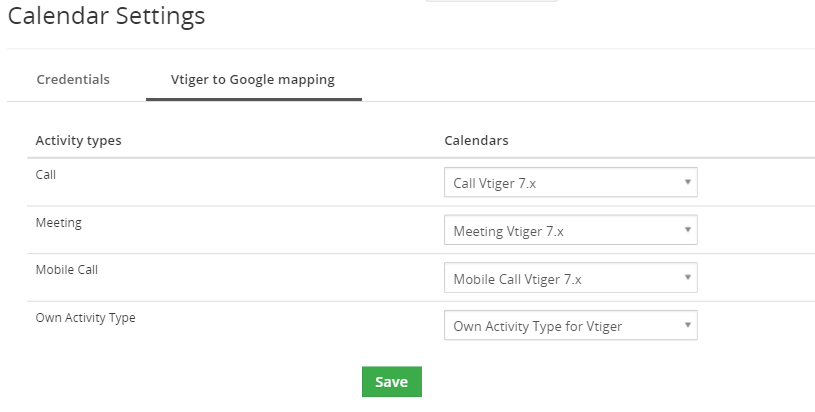
Map each Vtiger activity type to a different Google Calendar
A key benefit of this extension is the ability to map different Vtiger activity types to different Google calendars. This helps users keep Meetings, Calls, Mobile Calls and other activities visually separated in Google Calendar.
For example, Meetings can be synchronized to a Client Meetings calendar, Calls can be synchronized to a Call Calendar and Mobile Calls can be synchronized to a separate mobile activity calendar.
- Better overview in Google Calendar
- Separate work types into dedicated calendars
- Use Google Calendar colors for activity segmentation
- Keep CRM activity planning easier to understand on mobile devices
| Manual action | No daily manual synchronization needed when Cron is configured correctly. |
|---|---|
| New activity | New Vtiger activity can be pushed to Google Calendar automatically. |
| Changed activity | Updated time, title or event details can be synchronized according to sync settings. |
| Deleted activity | Deleted events can be synchronized depending on selected configuration. |
Hands free sync via Cron
Synchronization is automatically and regularly executed by Cron. Users do not need to remember clicking a manual sync button. The system can process activity changes in the background and keep calendars aligned.
This is useful for teams where calendar reliability matters, such as field sales, customer meetings, service planning and management overview of user schedules.
- Automated background synchronization
- Reduced manual work for users
- Better reliability for repeated activity updates
- Improved mobile notifications through Google Calendar
Use cases for Google Calendar Sync in Vtiger CRM
Google Calendar Sync helps sales teams, field reps, managers and support teams avoid duplicate work, improve mobile visibility and keep CRM activities synchronized with everyday calendar tools.
Sales and Field Team Efficiency
On the go sync for field sales reps
A sales rep can create a meeting directly in Google Calendar on mobile. With bidirectional synchronization, the event can be reflected in Vtiger CRM so the office team has better activity visibility.
Prevent double bookings
When personal or work calendar time is visible through synchronization settings, the risk of scheduling a client meeting over another appointment is reduced.
Team Organization
Map activity types to separate calendars
Meetings, Calls and Mobile Calls can be synchronized into different Google calendars, making the user schedule easier to read and visually organize.
One way or bidirectional sync control
Managers can choose Vtiger to Google only, Google to Vtiger only or bidirectional synchronization according to internal data policy.
Automation and Time Saving
Hands free automated sync via Cron
Synchronization can run automatically in the background, reducing manual work and making calendar updates more consistent.
Google Calendar notifications
When a Vtiger activity is synchronized to Google Calendar, users can benefit from native Google notifications on smartphones, tablets and smart watches.
Google Calendar Sync yearly licenses
Choose a license by the number of users who need Google Calendar synchronization. For package customers, Google Calendar Sync is also available in Mini, Extended and All Access with included user limits.
1 User
18€ / yearly
1.50€ per user monthly equivalent.
- 1 CRM user
- Google Calendar sync
- Manual included
5 Users
80€ / yearly
1.34€ per user monthly equivalent.
- 5 CRM users
- Team sync
- Activity mapping
10 Users
140€ / yearly
1.17€ per user monthly equivalent.
- 10 CRM users
- Bidirectional sync
- Cron automation
20 Users
240€ / yearly
1.00€ per user monthly equivalent.
- 20 CRM users
- Field planning
- Google alerts
50 Users
500€ / yearly
0.84€ per user monthly equivalent.
- 50 CRM users
- Sales teams
- Auto sync
100 Users
800€ / yearly
0.67€ per user monthly equivalent.
- 100 CRM users
- Large teams
- Activity split
Included in Mini, Extended and All Access packages
Google Calendar Sync is also available in selected Vtiger extension packages. Mini includes 1 user, Extended includes 3 users and All Access includes 5 users for Google Calendar Sync.
Packages can be a better choice when you also need other Vtiger CRM extensions for PDF generation, email templates, reporting, automation, security or advanced customization.
Very well documented
The manual explains how to configure Google Calendar Sync for Vtiger CRM, connect Google Calendar, set synchronization options and prepare the extension for everyday CRM activity synchronization.
Use the documentation when setting up automatic synchronization, bidirectional sync, activity type mapping and Google Calendar connection for Vtiger CRM users.
Google Calendar Sync FAQ
Short answers for Vtiger CRM users and administrators looking for Google Calendar integration, automatic synchronization and activity mapping.
What is Google Calendar Sync for Vtiger CRM?
It is a Vtiger CRM extension that synchronizes Vtiger activities with Google Calendar so users can keep CRM events and calendar events aligned.
Which Vtiger versions are supported?
The extension is prepared for Vtiger CRM 7.x and Vtiger CRM 8.x.
Does it support bidirectional synchronization?
Yes. Google Calendar Sync can be configured for bidirectional synchronization, depending on your selected sync settings.
Can I synchronize only from Vtiger to Google Calendar?
Yes. You can use one way synchronization when you want Vtiger activities visible in Google Calendar without sending Google events back to CRM.
Can different Vtiger activity types use different Google calendars?
Yes. The extension allows mapping each activity type to a different Google Calendar, for example Meetings, Calls and Mobile Calls.
Does synchronization run automatically?
Yes. Synchronization can be executed automatically and regularly by Cron, so users do not need to run synchronization manually.
Does it synchronize changed or deleted activities?
Yes. Each creation, modification or deletion in Vtiger or Google can be synchronized according to selected synchronization settings.
Is it useful for field sales teams?
Yes. Field sales reps can use Google Calendar on mobile while management keeps better visibility of scheduled activities in Vtiger CRM.
Can it help prevent double bookings?
Yes. Calendar synchronization improves visibility of scheduled time and helps reduce conflicts when planning client meetings or team activities.
Is Google Calendar Sync included in packages?
Yes. Mini includes 1 user, Extended includes 3 users and All Access includes 5 users for Google Calendar Sync.
Where can I find the manual?
The manual is available from the documentation section on this page and explains setup, connection and synchronization options.
How do I sync Vtiger with Google Calendar automatically?
Configure the extension, connect Google Calendar and set Cron so synchronization runs in the background at regular intervals.
Have questions before purchase?
Contact us if you are not sure which user license you need, how activity mapping should be configured or whether your Vtiger CRM setup is ready for Google Calendar synchronization.
- Compatibility questions for Vtiger 7.x and 8.x
- Help with Google Calendar connection
- Advice for one way or bidirectional synchronization
- Activity type mapping and Cron setup guidance
Start using Google Calendar Sync for Vtiger CRM
Synchronize Vtiger CRM activities with Google Calendar, automate updates through Cron and organize different activity types into separate Google calendars.
Explore all Vtiger extensions
Combine Google Calendar Sync with other Vtiger CRM extensions for PDF generation, reporting, email templates, automation, document handling and advanced CRM customization.