
Dynamic Fields for Vtiger CRM
Make Vtiger CRM forms cleaner, smarter and easier to use. Dynamic Fields helps administrators show, hide, require or lock fields and blocks based on conditions created through Process Flow.
Dynamic form behavior
Field actions applied by CRM conditionsCreate cleaner CRM forms with conditional field logic
Dynamic Fields for Vtiger CRM helps reduce UI clutter in Vtiger by changing the form layout according to the current record data. Administrators can create rules that make selected fields or blocks visible, hidden, mandatory or read only when defined conditions are met.
This is useful for sales pipelines, invoices, support tickets, approval processes, data quality checks and any CRM process where users should see only the fields that matter at the current step.
- Support of standard Vtiger modules and custom modules
- Support of standard fields and custom fields
- Show or hide fields based on condition results
- Show or hide whole field blocks dynamically
- Make fields mandatory based on status, stage, type or another value
- Set fields to read only to prevent data modification after approval
- Works with related record conditions through Process Flow configuration
- Prepared for Vtiger CRM 7.x and Vtiger CRM 8.x
Dynamic Fields features
Configure dynamic Vtiger forms for better user experience, cleaner data entry and stronger control over important CRM fields.
Hide Fields
Hide fields that are not relevant for the current record status, type, stage or process condition.
Show Fields
Show additional fields only when the user selects a value that requires more information.
Mandatory Fields
Make selected fields mandatory based on conditions such as sales stage, invoice status or ticket priority.
Read Only Fields
Lock fields after approval, payment, closing or another important CRM status change.
Dynamic Blocks
Hide or show complete Vtiger CRM blocks for progressive disclosure and cleaner forms.
Custom Fields
Use Dynamic Fields also with custom fields and custom blocks created for your CRM process.
Custom Modules
Apply dynamic form behavior in supported standard and custom Vtiger modules.
Real Time Changes
Field behavior is applied while users work with the form, helping them react immediately.
Process Flow Logic
Define conditions using the free Process Flow extension required for Dynamic Fields.
UI Clutter Reduction
Reduce long forms and show users only the fields needed for the current workflow step.
Data Protection
Prevent accidental data changes in paid invoices, approved records or completed steps.
Vtiger 7.x and 8.x
Prepared for commonly used Vtiger Open Source 7.x and 8.x installations.
Process Flow free extension is required
Dynamic Fields uses conditions created through Process Flow. Before using Dynamic Fields, install the free Process Flow extension and define the conditions that should control field or block behavior in your Vtiger CRM forms.
- Create conditions in Process Flow
- Use the condition result to apply Dynamic Fields actions
- Control form behavior based on statuses, stages, picklists and other values
- Keep the field behavior aligned with your real CRM workflow
Define conditions and apply field actions
Administrators can prepare a rule for one or more fields or blocks. When the condition is true, Dynamic Fields applies the selected action to the configured field or block. This helps answer common Vtiger CRM needs such as how to make a field mandatory based on status in Vtiger, how to hide fields dynamically or how to prevent data modification after approval.
- Select a module where the dynamic behavior should work
- Create a condition in Process Flow
- Choose whether to show, hide, make mandatory or set read only
- Select fields or blocks that should be controlled
- Test the behavior in the Vtiger record form
Important notes
Quick create Vtiger feature does not work with Dynamic Fields. Dynamic field rules are intended for the standard record form experience.
Default Vtiger layout settings such as hide, mandatory and similar settings will not be overwritten by Dynamic Fields. The extension works as an additional layer of conditional form behavior.
Changes are applied in real time
Dynamic Fields updates the form while the user works with the record. This helps users understand which fields are required, which fields are hidden and which values should no longer be changed.
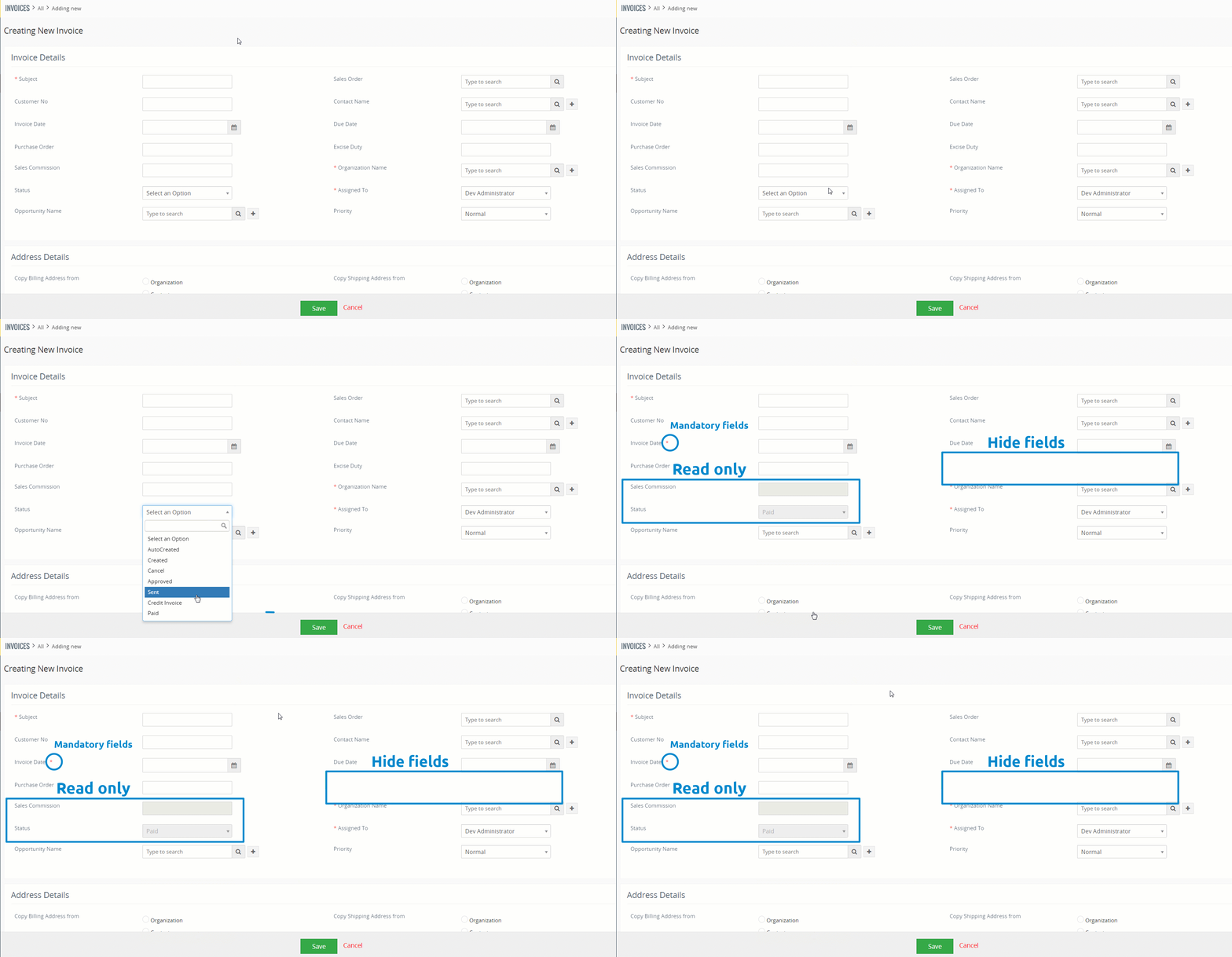
The preview shows real time Dynamic Fields behavior in Vtiger CRM when field conditions change during record editing.
Click the image to open full size preview.
Dynamic Fields preview
See how Dynamic Fields can control field actions, use Process Flow conditions and work with custom fields and custom blocks in Vtiger CRM.
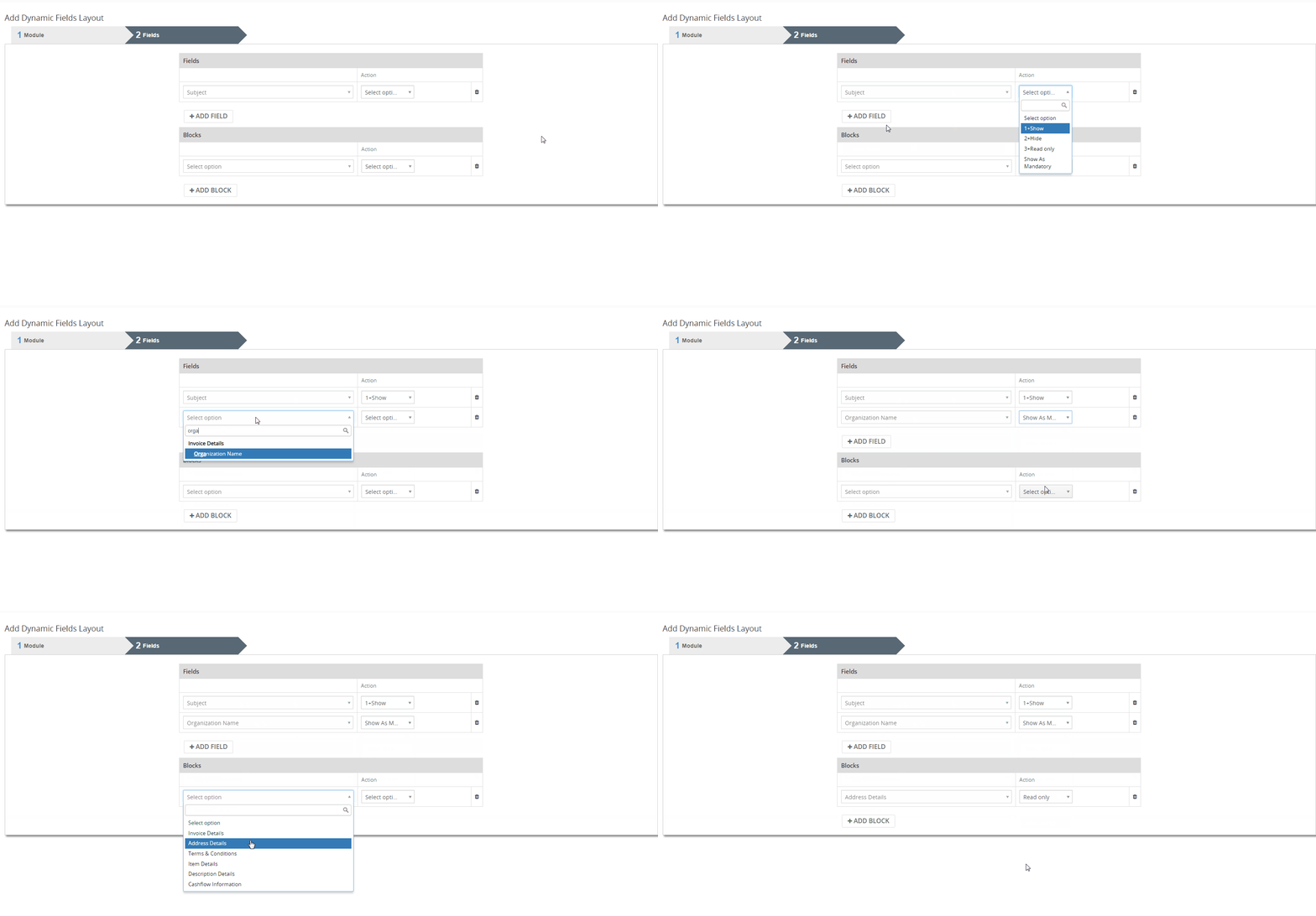
Choose the actions for fields and blocks you require. Dynamic Fields supports hiding, showing, mandatory behavior and read only behavior.
Click the preview to open full size image.

Create Dynamic Fields conditions via Process Flow and use them to control the behavior of fields and blocks in Vtiger CRM forms.
Click the screenshot to open full size image.
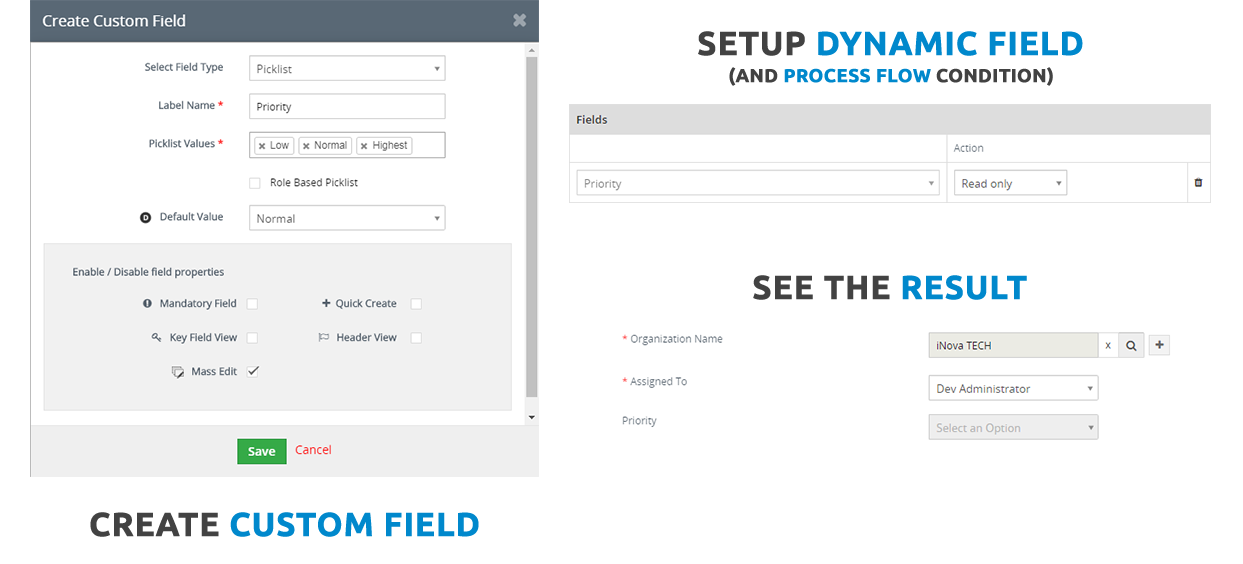
Dynamic Fields works with custom fields and custom blocks too, so administrators can create smarter forms for custom CRM processes.
Click the screenshot to open full size image.
Changes are applied in real time, helping users fill in only relevant fields and avoid unnecessary form complexity.
Click the preview to open full size image.
Use cases for Dynamic Fields in Vtiger CRM
Dynamic Fields is useful when CRM forms should adapt to the actual business situation. These examples describe common ways to use conditional logic for Vtiger fields across sales, finance, support and data quality workflows.
Sales and Pipeline Management
Conditional mandatory fields based on Sales Stage
When a salesperson moves an Opportunity to Closed Won, fields such as Contract Number or Final Price can become mandatory before the record can be saved.
Hide irrelevant fields for specific product types
If the customer buys Software, fields related to physical delivery, package dimensions or logistics can be hidden. If the product type is Hardware, the same fields can be shown again.
Invoicing and Finance
Lock fields after invoice is paid
When Invoice Status is Paid, fields such as Subject, Price or Due Date can be changed to read only, helping prevent accidental edits after payment.
Dynamic tax and duty fields based on country
If the customer address is outside the EU, fields for excise duty, customs duty or special tax information can be shown. For domestic customers, those fields can remain hidden.
Customer Support and Ticketing
Escalation fields for high priority tickets
If a Ticket priority is Urgent or High, a new escalation block can be shown and fields such as Escalation Manager or Root Cause Analysis can become mandatory.
Dynamic layouts for bugs and feature requests
If the user selects Bug, the form can show Steps to Reproduce and Browser Version. If the user selects Feature Request, these fields can be hidden and Business Value can be shown instead.
Data Quality and Clean UI
Simplifying complex forms
Instead of showing 50 fields at once, the form can reveal additional fields and blocks step by step based on user input. This reduces mistakes and speeds up data entry.
Role based process guidance via statuses
Dynamic forms can guide backend teams through the exact fields needed in each process step without showing irrelevant information that belongs to another stage.
Choose the action, condition and target fields
Use Dynamic Fields to connect business rules with visible CRM form behavior. The same logic can help reduce clutter, enforce required data and protect completed records.
Choose field and block actions
Select whether a field or block should be hidden, shown, mandatory or read only based on your CRM process.
Create conditions via Process Flow
Use Process Flow to define when a Dynamic Fields action should be applied to fields or blocks.
Works with custom fields and blocks too
Apply conditional logic to fields and blocks created for your custom business workflow.
Available in the All Access Package
Dynamic Fields is available in the All Access Package. This is a good option for customers who want a complete Vtiger CRM extension package with advanced automation, forms, documents, reporting and customization tools.
Very well documented
The manual explains how to install Dynamic Fields, configure field actions, work with Process Flow conditions and create dynamic Vtiger CRM forms for supported modules.
Use the documentation when preparing rules for hide and show fields, mandatory fields, read only fields, custom fields, custom blocks and condition based form behavior.
Dynamic Fields FAQ
Short answers for Vtiger CRM users and administrators who want conditional logic for fields, dynamic blocks and cleaner CRM forms.
What is Dynamic Fields for Vtiger CRM?
Dynamic Fields is a Vtiger CRM extension that allows administrators to show, hide, require or lock fields and blocks based on conditions.
Which Vtiger versions are supported?
The extension is prepared for Vtiger CRM 7.x and Vtiger CRM 8.x.
Does Dynamic Fields require another extension?
Yes. Dynamic Fields requires the free Process Flow extension because the field behavior is controlled by Process Flow conditions.
Can I make a field mandatory based on status in Vtiger?
Yes. You can create a condition based on a status, stage, type or another field value and make selected fields mandatory when the condition is true.
Can Dynamic Fields hide and show blocks dynamically?
Yes. Dynamic Fields can be used to hide or show fields and blocks dynamically, helping reduce UI clutter in Vtiger CRM.
Can fields be set to read only?
Yes. Fields can be changed to read only based on conditions, for example after an invoice is paid or a record is approved.
Does it work with custom fields?
Yes. Dynamic Fields can work with standard fields, custom fields and custom blocks in supported Vtiger modules.
Does it work with custom modules?
Yes. The extension supports standard Vtiger modules and custom modules where the form structure can be controlled by Dynamic Fields.
Does Quick Create work with Dynamic Fields?
No. Quick create Vtiger feature does not work with Dynamic Fields. Dynamic Fields is intended for the standard record form experience.
Will Dynamic Fields overwrite default Vtiger layout settings?
No. Default Vtiger layout settings such as hide, mandatory and similar settings will not be overwritten by Dynamic Fields.
Is Dynamic Fields included in packages?
Yes. Dynamic Fields is available in the All Access Package and can also be purchased separately with monthly or yearly billing.
What are typical use cases?
Typical use cases include sales stage rules, invoice protection after payment, ticket escalation fields, dynamic bug tracking forms and progressive disclosure for complex CRM forms.
Have questions before purchase?
Contact us if you are not sure whether Dynamic Fields fits your Vtiger CRM process, if you need help with Process Flow conditions or if you want to prepare smarter forms for sales, finance, support or custom modules.
- Compatibility questions for Vtiger 7.x and 8.x
- Help with Process Flow condition setup
- Advice for hide, show, mandatory and read only field rules
- Support for custom fields, custom blocks and custom modules
Start using Dynamic Fields for Vtiger CRM
Build cleaner Vtiger CRM forms with conditional logic for fields and blocks. Show only relevant fields, make important fields mandatory and protect completed records with read only behavior.
Explore all Vtiger extensions
Combine Dynamic Fields with other Vtiger CRM extensions for automation, PDF generation, reporting, email templates, document handling and advanced CRM customization.