
Installer for Vtiger CRM
Manage ITS4YOU extensions directly inside Vtiger CRM. Install modules, validate licenses, check updates and access extension actions from one clean interface.
Installer Features
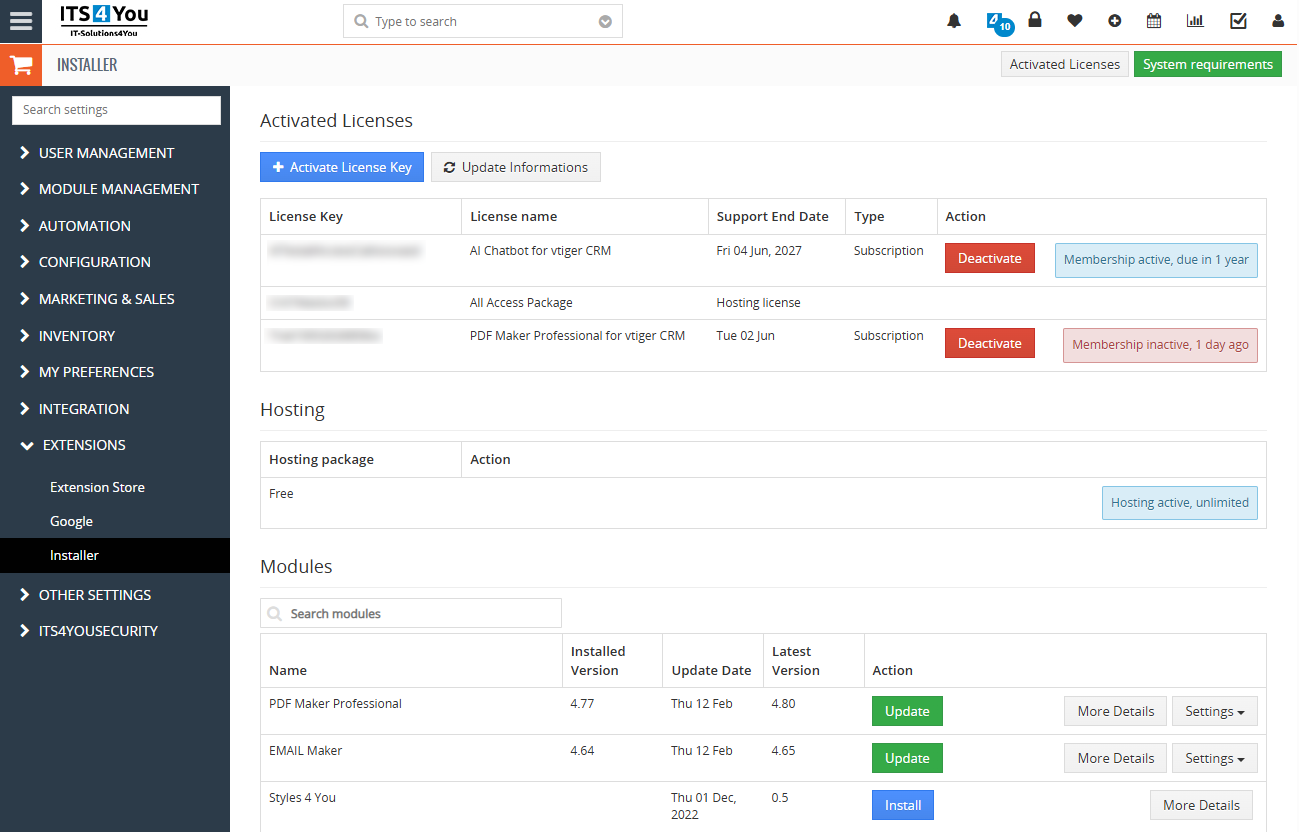
Installer helps you manage your Vtiger extensions in one place. Users can see installed modules, validate licenses, run updates and open module settings directly from CRM.
- Easy modules management in one screen
- See actual installed modules and their versions
- Update and install modules with one click
- License management and expiration dates
- Action menu for each module
- Notifications icon at the top of the screen
- Modules shop and extension packages in a few clicks
- Free Vtiger extension to download
- Available for Vtiger 7.x and 8.x
Start using Installer now
Register to our My Account portal where you can download Installer with a single click from your Dashboard. On the My Account Dashboard you will also manage all licenses and subscriptions.
Who is Installer for?
Installer is built for Vtiger CRM users who need a reliable way to manage ITS4YOU extensions, licenses and updates from one place.
Vtiger CRM administrators
Useful for admins who manage extensions, license validation, module updates and customer CRM installations.
Companies using ITS4YOU extensions
Suitable for companies that use PDF Maker, Email Maker, Reports, packages or other ITS4YOU modules.
Vtiger developers and integrators
Helps developers keep customer environments organized, updated and connected with the validation system.
How Installer works
Installer keeps the original process simple. Install the module, access it from CRM settings or notifications, validate your licenses and manage extension actions from one place.

Installation
Installation is simple and follows the standard Vtiger Module Manager process.
- First register to our My Account portal. After you login you will see Installer available to download in the Dashboard.
- Click on the Installer and download the ZIP installation package.
- Open Module Manager.
- Import and install ZIP file.
- That is all.
When you choose our Vtiger hosting services, Installer will be automatically installed into your CRM hosting domain.
Accessibility
After successful installation of Installer you can start with validation and extension management.
-
Click on the Notifications icon
 and then on the button Manage Extensions
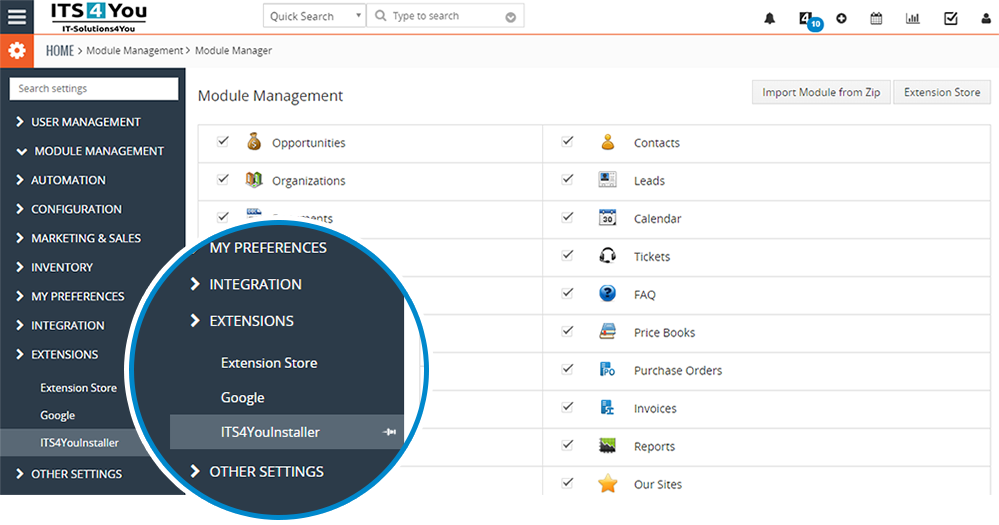
- Or use Main Menu, Settings, CRM Settings, Extensions and ITS4YouInstaller
License management
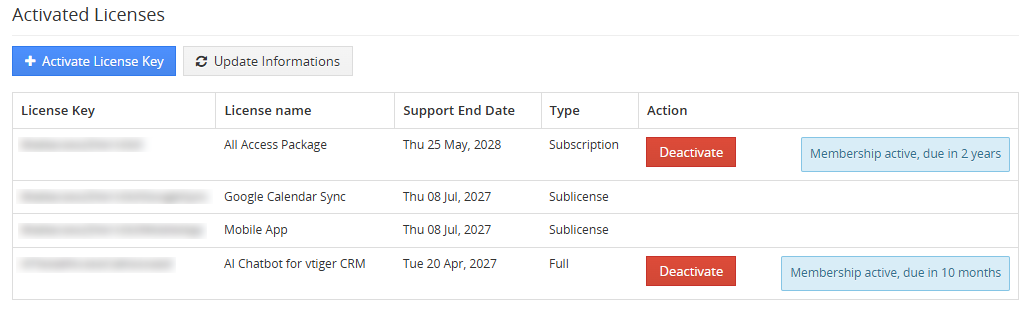
To see modules and manage licenses simply visit the Installer in your CRM.
How to validate license key:
- Click the Activate License Key button and enter your license key.
- Confirm with the Validate button.
Other Actions
- Deactivation of license is performed simply with the button Deactivate near active license.
- Update Information click if you contacted support and they requested it to update and synchronize your license with the ITS4YOU Validation system.
Vtiger modules management
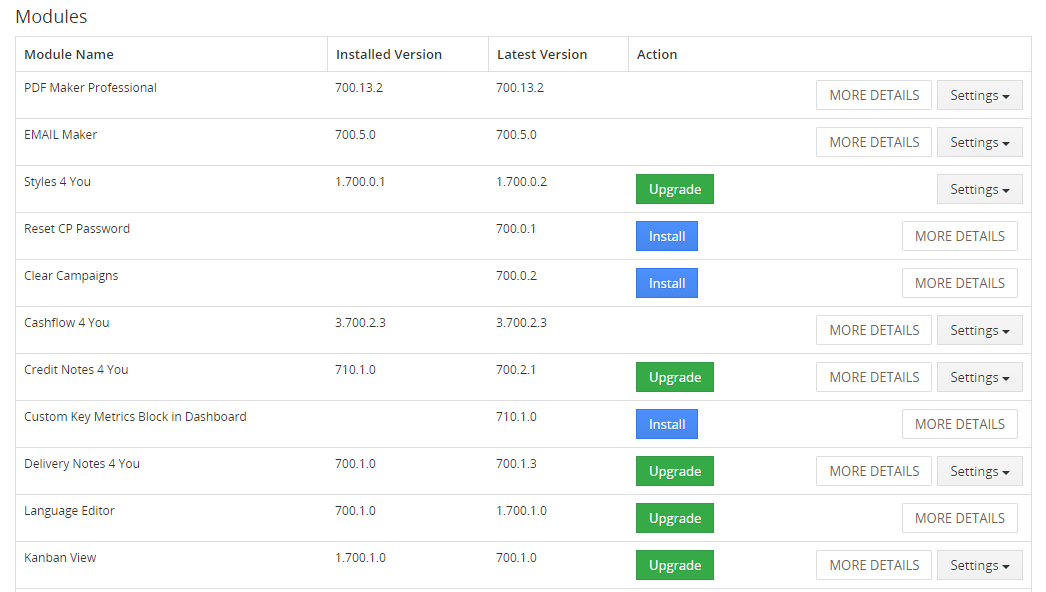
In the Modules list tab you can manage extensions using available actions.
- See your current installed version.
- Validation status appears when modules are purchased or available.
- If your module is outdated, the Upgrade button appears under Actions.
- The Settings button allows additional actions like upgrade, uninstall and license settings.
- More Details redirects you to the extension page, where you can check more details about how to use it.
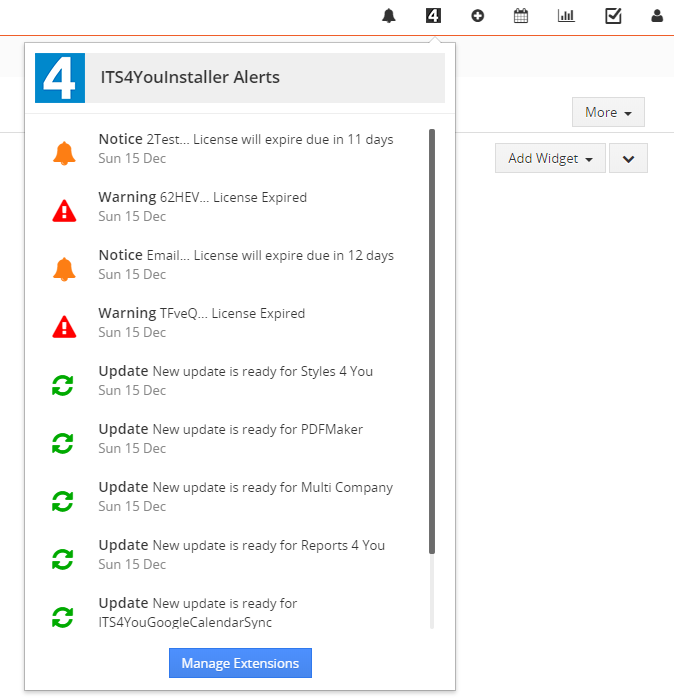
Notifications
Notifications in Installer are shown through the alert icon in the CRM top bar.
- Green icon shows available upgrades for extensions.
- Orange warning notification means your license expires soon.
- Red warning notification means your license has expired and renewal is required.
- You can access the Installer by clicking the Manage Extensions button.
What you can manage with Installer
Installer is not only an installation tool. It also helps users keep extensions organized and reduces manual work during license validation and module updates.
Modules
View installed modules, versions and available module actions in one screen.
Licenses
Validate licenses and check license information directly inside your CRM.
Updates
See available updates and upgrade supported extensions more easily.
Subscriptions
Manage subscriptions and license related information through your My Account Dashboard.
Very well documented
Find detailed guides, installation steps and practical instructions for using Installer with your Vtiger CRM extensions.

Frequently Asked Questions
Short answers about Installer for Vtiger CRM, license validation, downloads, compatibility and extension management.
Is Installer for Vtiger CRM free?
Yes. Installer is a free extension management tool used to install, validate and manage ITS4YOU extensions inside Vtiger CRM.
Where can I download Installer?
You can download Installer from your My Account Dashboard after registration and login.
Does Installer work with Vtiger 8.x?
Yes. Installer is available for Vtiger 7.x and Vtiger 8.x installations.
Do I need Installer for license validation?
Yes. Installer is used to activate, validate, deactivate and synchronize licenses for supported ITS4YOU Vtiger extensions.
What can I manage with Installer?
You can manage installed modules, versions, license status, updates, subscriptions and available module actions.
Can Installer show extension notifications?
Yes. Installer can show update and license notifications through the alert icon in the Vtiger CRM top bar.
Related resources
Useful links for Installer, Vtiger extensions, documentation, hosting and extension packages.
Installer Documentation
Read detailed instructions for installing, validating and managing extensions with Installer.
Open documentationVtiger Extension Packages
Compare available ITS4YOU packages and choose the right option for your CRM.
Compare packagesVtiger Extensions
Browse available Vtiger CRM extensions for documents, emails, reports, automation and more.
Browse extensionsVtiger CRM Hosting
Use managed Vtiger hosting where Installer can be automatically included in your CRM setup.
View hosting serviceMy Account
Register, download Installer, manage licenses and review your subscriptions from one portal.
Open My AccountExplore All Vtiger Extensions
Browse our complete collection of Vtiger extensions and discover more tools for your CRM.