
Module Builder for Vtiger CRM
Create custom Vtiger CRM modules faster without manual coding. Define module names, prefixes, icons, numbering, fields, layouts, list views and 1:M or N:M relationships from one administration tool.
Add New Module
Define a CRM module from one setup screenCreate structured CRM modules for your business process
Module Builder helps CRM administrators create new modules that follow a consistent Vtiger structure. It is useful when standard CRM modules are not enough and your business needs custom objects, custom fields, 1:M relationships, N:M relationships, navigation and list views.
- Create custom modules for Vtiger CRM 7.x and 8.x
- Define module prefix, module name and numbering prefix
- Place modules into the correct parent menu
- Select module icons for better navigation
- Add custom fields and manage layouts
- Create 1:M and N:M relationships between created modules
- Export created modules and import them into another CRM
- Manage list view columns and improve record visibility
Main Features of Module Builder
A compact feature overview for administrators who want to extend Vtiger CRM with custom modules, custom fields, 1:M and N:M module relationships and cleaner navigation without writing module boilerplate manually.
Custom Module Name
Create business specific modules with clear names that match your internal process.
Module Prefix
Set a short unique module prefix and keep created modules easier to identify.
Parent Menu Positioning
Place new modules into the right CRM menu for faster user navigation.
Module Icons
Assign icons to custom modules so users can recognize them quickly.
Numbering Prefix
Configure record numbering prefixes and starting sequence for custom records.
1:M Relations
Create one to many relations between custom modules and organize related records.
N:M Relations
Create many to many relations for more flexible module connections and data models.
Export and Import
Export created modules and import them into another compatible Vtiger CRM.
List View Management
Control columns and improve record browsing in the created module list view.
Duplicate Prevention
Prepare cleaner data structures and reduce duplicated CRM records in custom workflows.
Custom Fields
Add fields that capture the information your team needs for each process.
Safe Uninstall Protection
Prevent uninstalling a main module while related modules still exist to help protect CRM data.
Module Builder preview
See how Module Builder supports module creation, post creation configuration and custom field setup directly in Vtiger CRM.
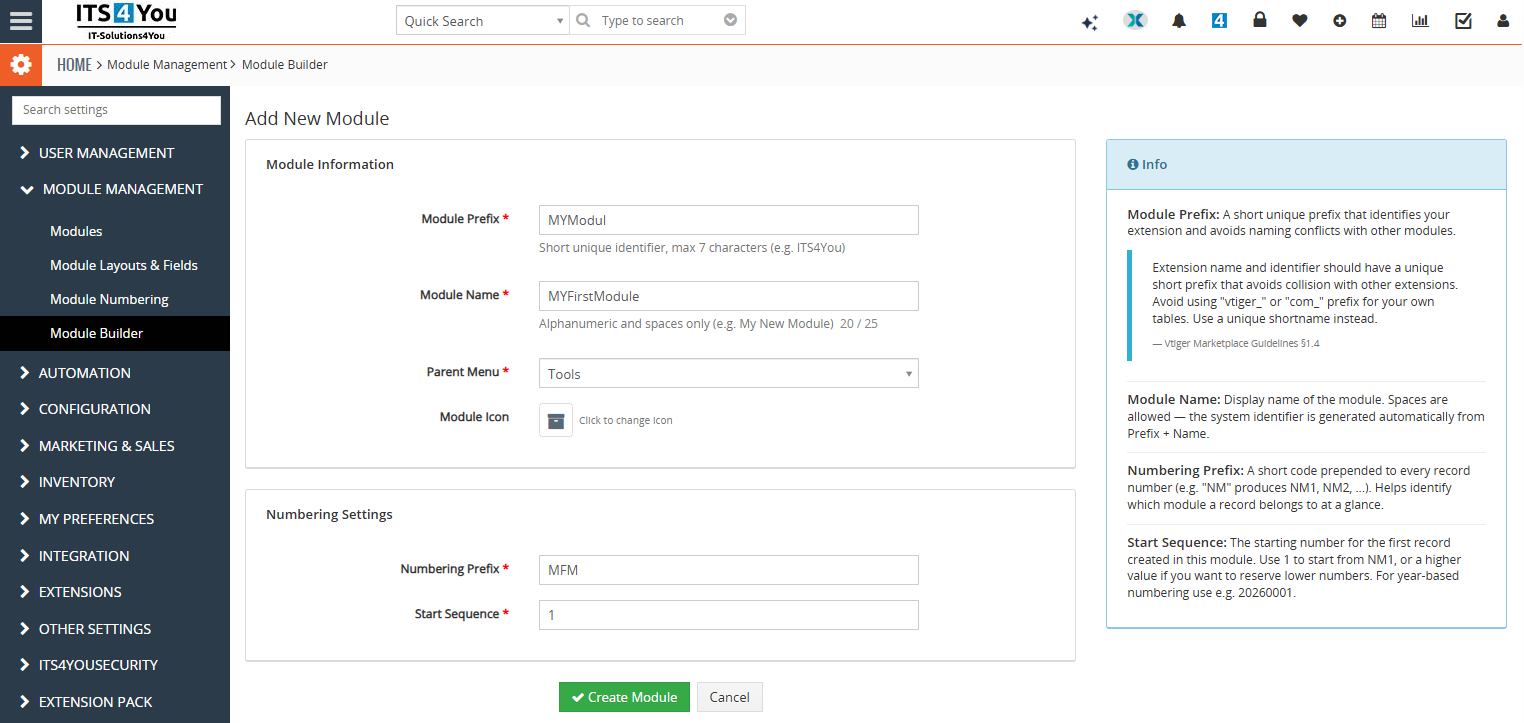
View 1 shows the module creation screen where administrators define the module prefix, module name, parent menu, module icon and numbering settings.
Click the screenshot to open full size image.
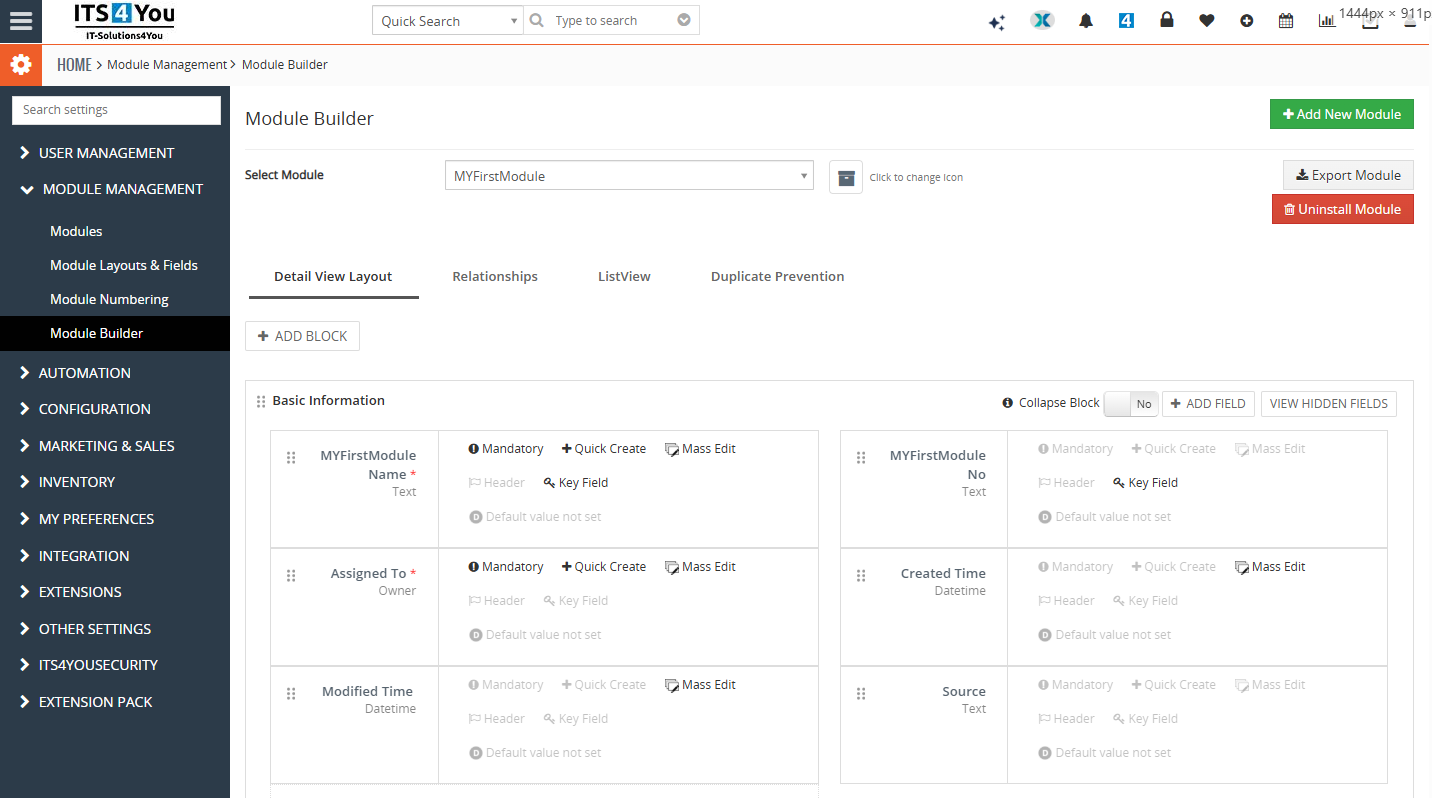
View 2 shows the created module configuration area where administrators can continue with actions such as adding fields and managing module settings.
Click the screenshot to open full size image.
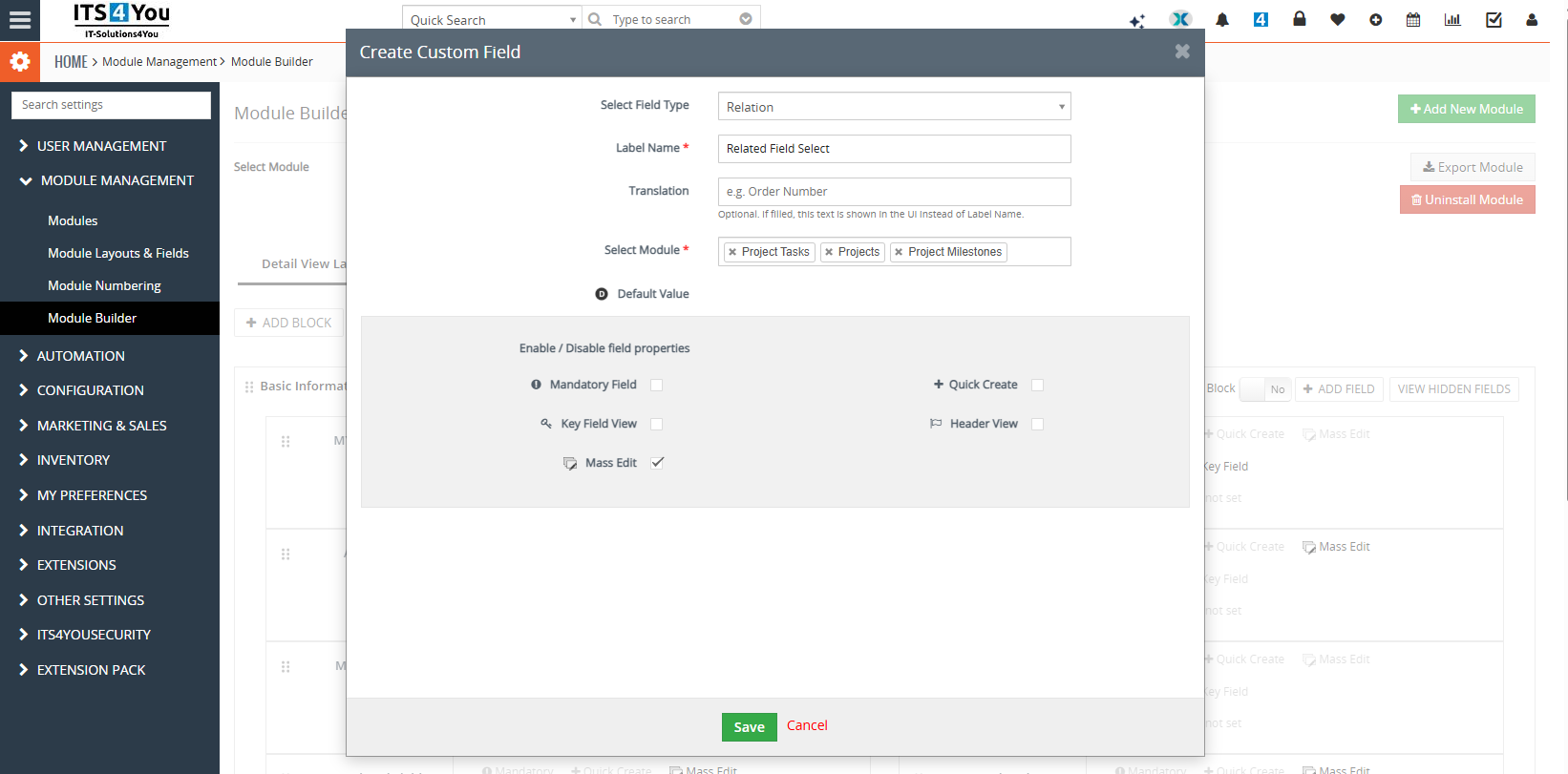
View 3 shows custom field creation for a selected module, helping administrators expand the module with business specific data fields.
Click the screenshot to open full size image.
Watch Module Builder in action
See how Module Builder works directly inside Vtiger CRM. The video shows the module creation process and helps administrators better understand how custom modules can be prepared without manual coding.
Watch the video directly on this page to see how custom module creation works in Vtiger CRM.
Extend Vtiger CRM around your real workflow
Standard CRM modules are not always enough. Module Builder helps you create structured modules for processes such as service contracts, assets, projects, installations, internal requests, custom approvals or industry specific records.
- Model business objects that do not fit standard Vtiger modules
- Keep CRM users inside one consistent interface
- Create 1:M relations for parent and child record structures
- Create N:M relations for flexible many to many module connections
- Reduce manual development work for repeated module needs
- Prepare a cleaner CRM structure for reporting, workflows and daily work
Designed with relationship safety in mind
Module Builder includes protection logic for related modules. The main module cannot be uninstalled while related modules still exist, which helps prevent accidental removal of module structures that are connected to other CRM data.
- Protects related module structures from accidental removal
- Supports safer administration of 1:M and N:M relations
- Encourages safer administration of custom modules
- Helps keep relationships between created modules under control
Recommended before creating modules
Before creating or changing custom modules in a production CRM, we recommend making a system backup. This is a standard best practice for CRM administration and helps avoid compatibility issues with an already running system, customizations or third party extensions.
Available in the All Access Package
Module Builder is available in the All Access Package. This is a good option for customers who want one package with advanced Vtiger CRM extensions, updates and tools for extending their CRM system.
Module Builder FAQ
Short answers for Vtiger CRM administrators comparing custom module options and deciding whether Module Builder fits their CRM customization workflow.
What is Module Builder for Vtiger CRM?
Module Builder is an administrative extension that helps create custom Vtiger CRM modules, configure module information, add fields, manage layout and prepare relationships between modules.
Which Vtiger versions are supported?
The extension is prepared for Vtiger CRM 7.x and Vtiger CRM 8.x. The documentation section on this page is focused only on Vtiger 7.x and 8.x.
Can I create 1:M relationships between modules?
Yes. Module Builder supports 1:M relationships, which are useful for parent and child module structures such as Accounts and related custom records.
Can I create N:M relationships between modules?
Yes. Module Builder also supports N:M relationships for many to many connections between custom modules and more flexible CRM data models.
Can created modules be moved to another CRM?
Yes. The page is prepared to promote export and import of created modules, so custom module structures can be reused in another compatible Vtiger CRM installation.
Is Module Builder useful without coding knowledge?
Yes. The main purpose is to reduce manual module creation work and give administrators a simpler interface for defining module basics, fields, layout and navigation.
How does uninstall protection work?
The main module cannot be uninstalled while related modules still exist. This helps protect CRM data structure and reduces the risk of removing connected custom modules by mistake.
Should I back up CRM before creating modules?
Yes. A backup is recommended before creating or changing modules in a production CRM. It is a normal administration practice, especially when the system already contains customizations or third party extensions.
Is Module Builder included in packages?
Yes. Module Builder is available in the All Access Package. It can also be purchased yearly using the buy button on this page.
Have questions or need assistance?
Not sure how to structure your custom modules, relationships or fields? Contact us and we will help you choose the right setup for your Vtiger CRM system.
- Help with module structure planning
- Support for 1:M and N:M relationship setup
- Advice before using Module Builder in production CRM
Very well documented
The manual describes how to create a new module, configure prefixes, add fields, manage layouts, create 1:M and N:M relationships and prepare the module for everyday Vtiger CRM usage.
Start using Module Builder for Vtiger CRM
Create custom modules, define fields, improve navigation and build 1:M or N:M module relationships. Compatible with Vtiger 7.x and Vtiger 8.x.
Explore all Vtiger extensions
Combine Module Builder with other Vtiger CRM extensions for reporting, PDF generation, automation, document handling and advanced CRM customization.