
E-Invoice / XRechnung for Vtiger CRM
Generate and send structured electronic invoices directly from your Vtiger Invoice module.
Create XRechnung XML files, send them by email and keep invoice information inside Vtiger. Review incoming e-invoices without copying invoice data into another application.
Available now from €9 per month.
- Available now
- Vtiger Open Source 8.x
- XRechnung XML invoices
Works alongside your existing accounting software.
E-invoicing from the CRM you already use
An electronic invoice contains structured data that other systems can process. Generate XRechnung from the invoice you created in Vtiger, then share the XML file with the recipient.
For German invoicing workflows
German businesses have needed to be able to receive domestic e-invoices since 1 January 2025. Requirements for issuing them follow a phased timetable. XRechnung provides a structured format for relevant recipients.
Less manual invoice work
Use customer and invoice data already in Vtiger to generate machine-readable XML. Check the file, email it to the recipient and keep a record of what was sent.
What the extension does today
Create XRechnung from existing invoices and manage the related e-invoice workflow in Vtiger.
Create e-invoices
Generate XRechnung XML from Vtiger invoices, including credit notes. Review the file before sending.
Send XML by email
Attach the generated electronic invoice to an outgoing email and send it from your Vtiger workflow.
Track invoice status
See invoice information and the sending status in Vtiger. Use a credit note when an issued invoice needs a correction.
Review invoice details
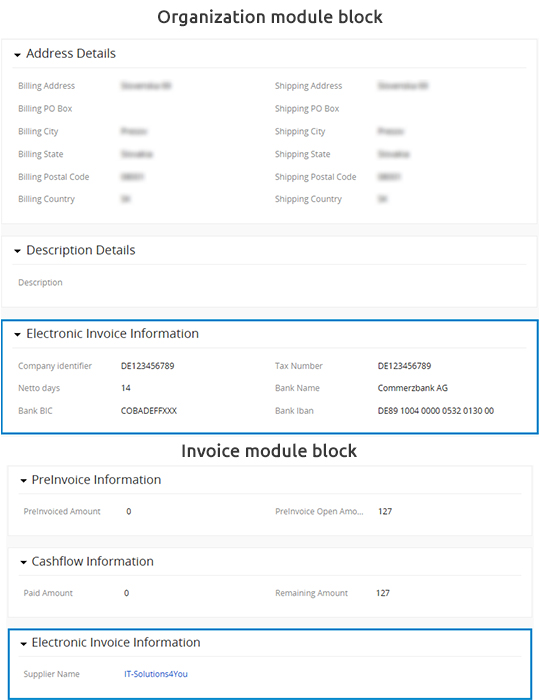
Check the electronic invoice information block and correct missing data before sending XML.
Receive e-invoices
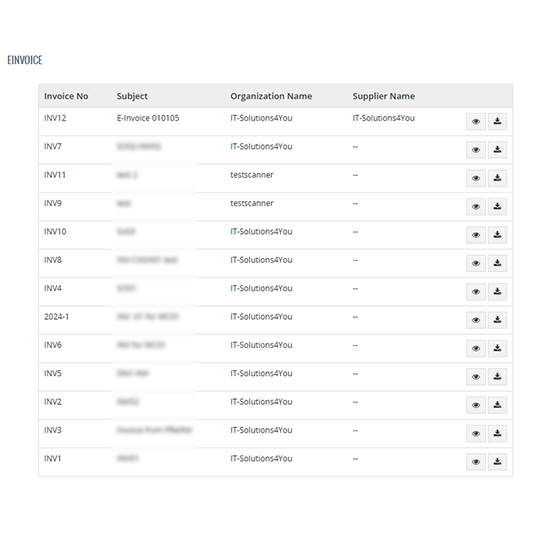
Review incoming invoices in a readable inbox with search and filters. Track internal processing from New through Checked and Approved for payment to Paid.
Export for accounting
Export selected received invoices as a ZIP of original XML files and a CSV summary, or send them to your accountant by email.
How e-invoicing works in Vtiger
Work in the usual Invoice module, then generate and send the structured XML.
Create
Prepare the invoice with your existing customer and line item data.
Generate
Export the XRechnung XML and check required invoice details.
Validate and send
Run the XML through a validator, then email it to the recipient.
Keep the record
Follow invoice information and related status inside Vtiger.
Sending XML invoices via email
Generate XRechnung XML from a Vtiger invoice and include the electronic document in an email to your customer. Check the recipient's preferred delivery method before sending.
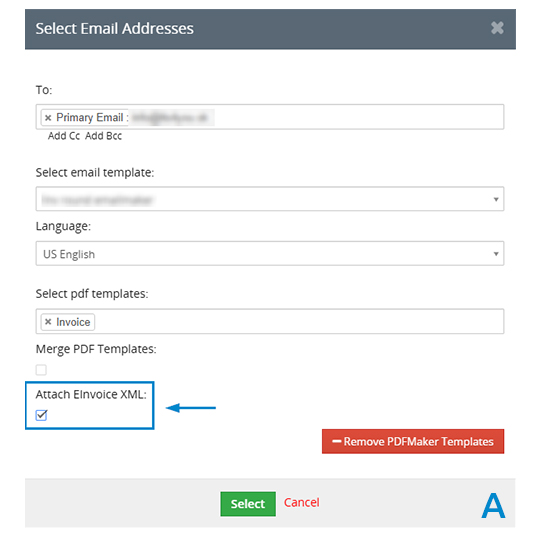
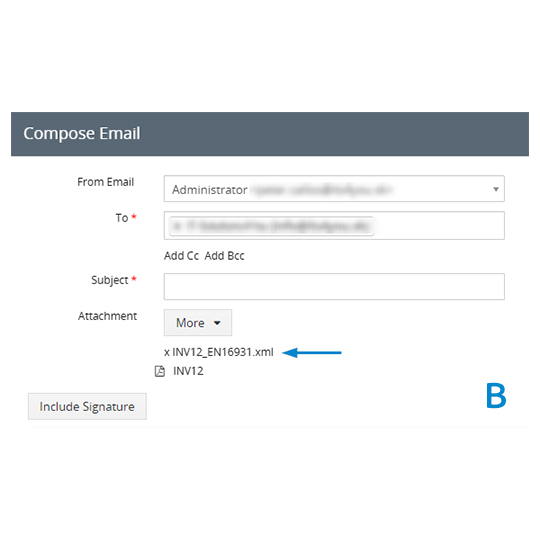
Electronic invoice information in Vtiger
See the module list and the information block for an electronic invoice. Select a screenshot to enlarge it.
Validate your e-documents before sending
Validate exported XRechnung XML to find missing fields, formatting issues and schema errors before you send an e-invoice to a customer or authority.
B2Brouter XML validation
Upload an XML file to check it against supported e-invoicing formats. It is also useful for viewing a readable preview of the document.
Open B2Brouter validatorBaden-Württemberg e-invoice validator
Check XRechnung XML against the validator configuration provided by the German state of Baden-Württemberg. This is our recommended check for XRechnung files.
Open E-Rechnungs-ValidatorExternal validation helps identify technical issues. Confirm the recipient's current requirements and review any errors before delivery.
Map the external invoice number
Choose which Vtiger field supplies the invoice number written
to the exported e-invoice. This helps when your official
business number is stored in invoice_no instead
of the default invoiceid.
When to change the mapping
-
Your recipient or external system expects the official
number from
invoice_no. - Your Vtiger installation uses a different numbering convention from the internal record ID.
- You want the XRechnung number to match the number shown in your existing invoice process.
The setting changes the exported number. It does not require a database change.
Configuration example
In the module configuration file, set the external invoice
ID field to invoice_no:
$ITS4YouEInvoice_Fields = [
    'id' => 'invoice_no',
];
Save the file and clear the Vtiger cache if needed.
The extension then uses vtiger_invoice.invoice_no
as the external invoice number.
Existing installations retain their current behavior until the mapping is changed. The mapping mechanism can support additional fields in future versions.
Keep your accounting software
Vtiger issues and sends electronic invoices while your accounting application continues to handle bookkeeping. Share received XML files and a CSV overview with your accountant without re-entering the issued invoice in another system.
Your existing workflow
Create an invoice once in Vtiger and produce the structured XRechnung XML from that record.
Provider connection when needed
Sending XML by email does not require a provider account. Provider-based delivery or reception requires a compatible provider under a separate contract.
Planned additions to the extension
These functions are being developed and are not included in the currently available version.
Accounting imports
Export issued and received invoices as POHODA XML or ISDOC for import into accounting software.
Choice of receiving system
Choose whether the CRM or accounting system receives invoices, with an overview in Vtiger where applicable.
Automatic sending
Send an e-invoice when its Vtiger invoice is marked as issued.
German hybrid PDFs
Create ZUGFeRD / Factur-X documents by embedding e-invoice data in a PDF generated with PDF Maker.
German supplier invoices
Read incoming CII / ZUGFeRD invoices from German suppliers.
E-Invoice extension pricing
Choose monthly or yearly billing. A separate provider may charge for its own services if you use provider-based delivery or reception.
Monthly
Flexible monthly subscription.
Buy monthlyYearly
One annual subscription payment.
Buy yearlyCompatible with Vtiger CRM 8.x.
E-Invoice and XRechnung FAQ
Answers to common questions about the Vtiger extension.
What is the difference between an e-invoice and a PDF?
A structured e-invoice contains machine-readable data. An ordinary PDF sent by email is a visual document and does not by itself contain the required structured invoice data.
Can I generate XRechnung from Vtiger?
Yes. Generate XRechnung XML from an existing Vtiger invoice, including credit notes. Validate the XML and check the recipient's delivery requirements.
Can I send an X-Rechnung XML file by email?
Yes. Attach the exported XML to an email. Ask your recipient whether email is an accepted delivery method for that invoice.
Can I validate an E-Rechnung XML file?
Yes. Export the XML and use one of the external validators linked above. Correct any reported errors in the invoice data, then export and validate again.
What is the difference between invoiceid and invoice_no?
invoiceid is the internal Vtiger record ID.
In many installations invoice_no holds the
business invoice number. Since version 4.5, you can configure
which field is mapped to the external invoice number.
Can I receive electronic invoices in Vtiger?
Incoming e-invoices can appear in a readable inbox with search, filters and internal processing states. Receiving requires the appropriate provider connection and configuration.
Is ZUGFeRD / Factur-X supported?
In development. Hybrid PDF generation with PDF Maker and reading incoming CII / ZUGFeRD invoices are planned additions.
Which Vtiger versions are compatible?
The extension is compatible with Vtiger CRM 8.x. Contact us if you need to confirm a specific installation.
Are einvoice and erechnung different products?
No. E-invoice is the English term for an electronic invoice; E-Rechnung is the German term. XRechnung is a specific structured format used in German invoicing workflows.
Bring e-invoicing into your Vtiger workflow
Generate XRechnung from existing CRM invoices, validate the XML and send it to your customers.
Explore all Vtiger extensions
Discover more tools for documents, communication, automation and CRM administration.