
Additional features for PreInvoice are:
- Create Invoice from PreInvoice
- Create Invoice from Relation
- Change System Services
- Support of PDF Maker
- Support of EMAIL Maker
6.1 Create Invoice from PreInvoice
You can create Invoice from PreInvoice via detail view or via list view.
Creating Invoice via Detail view
- In the detail view of PreInvoice you are able to create Invoice, click on
 button
and select “Create Invoice”: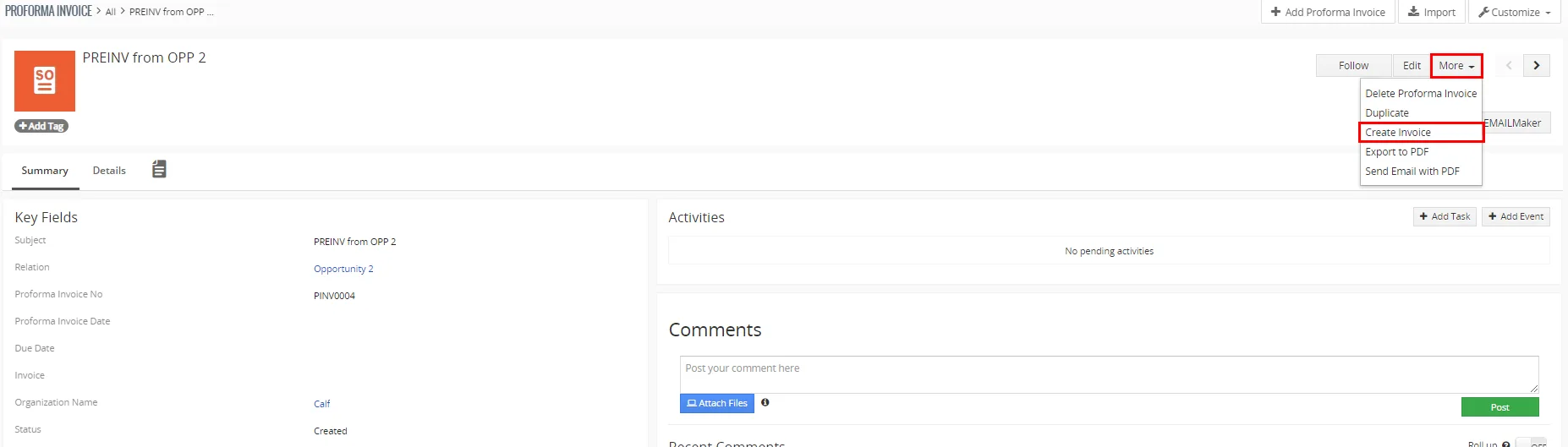
Creating Invoice from Proforma Invoice via Detail view - In appeared window please specify PreInvoice details according to your needs and click on
 button.
Creating Invoice via List view
- To create Invoice you need to choose one or more Preinvoice(s).
*Please note that the organization must be the same. - Click on button and then “Create Invoice from PreInvoice”.

Createing Invoice from Proforma Invoice via List view - In appeared window please specify PreInvoice details according to your needs and click on button.
 In the created Invoice will be (all) product(s) and service(s) from Preinvoice(s) included.
6.2 Create Invoice from Relation
You are able to create Invoice from Relation.
Before creating Invoice from Relation, make sure your PreInvoice records are related to Quotes or Sales Orders (Relation field).
- To create Invoice please choose one or more Preinvoice(s) via list view.
- Click on
 button and then Create Invoice from Relation.
- In appeared window please specify PreInvoice details according to your needs and click on button.
In the created Invoice will be (all) product(s) and service(s) assigned to Relation(s) included.
6.3 System Services
With these Settings you are able to manage Services used for Proforma Invoice.
By default, all services are in English Language, but you can edit them to your own Language or create additional Services and use them.
To access System Services, go to Proforma Invoice module, then click on  button and next on “Change System Services”:

The following window will appear:
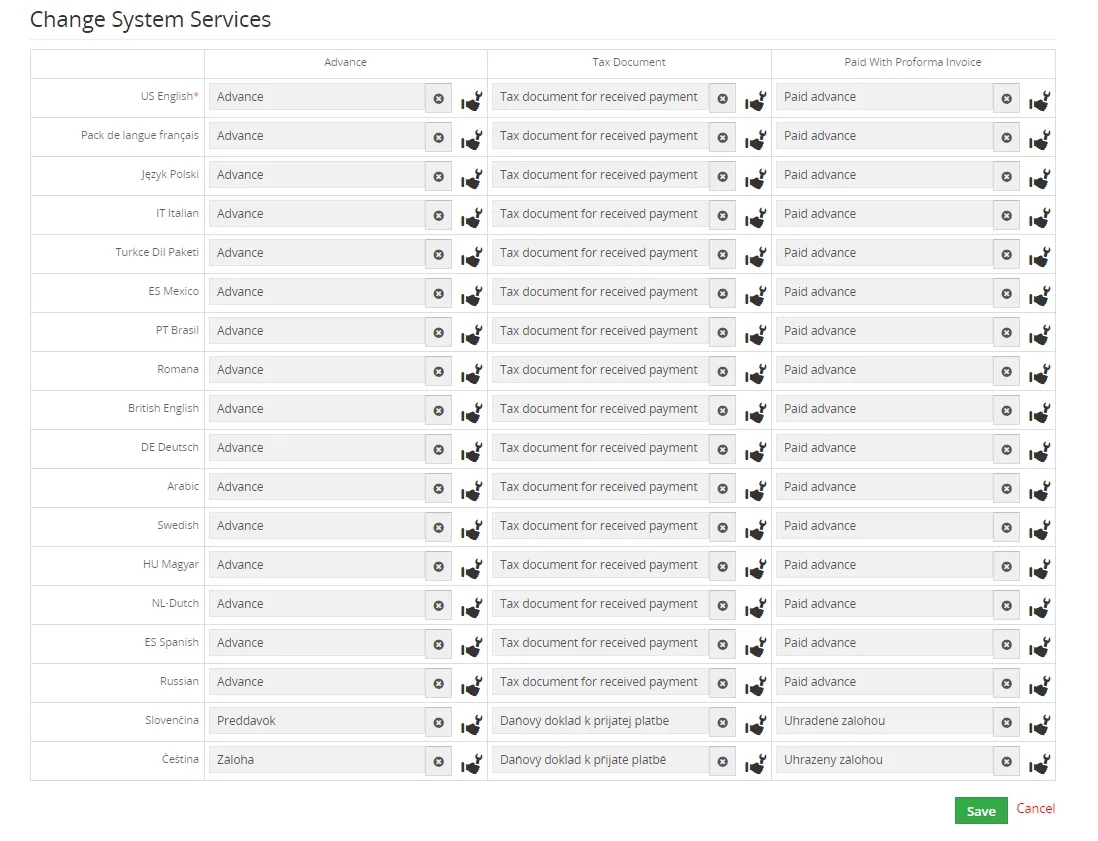
If you require to change the Service for Tax Document or Paid With Proforma Invoice, click on the Services Icon  and select the Service from the list.
Then confirm via button.
6.4 Support of PDF Maker
The PDF Maker is extension tool designed by ITS4You for Vtiger CRM.
It is powerful and flexible tool which allows users of Vtiger CRM to create own PDF templates.
Before creating PDF file you need to create template of PDF Maker. To create template please check manual for PDF Maker:
Manual for PDF Maker Vtiger 7.x
Please note that this will work only with PDF Maker Professional.
6.5 Support of EMAIL Maker
The Email Maker is extension tool designed for the Vtiger CRM.
Using EMAIL Maker, you can create email templates with predefined information and send them from all the modules. There are available all the fields from source and related modules, the fields related to recipients, the company information and many more. The intention was to provide powerful and flexible tool which allows users of vtiger CRM to create own email templates. Using the email templates you can send mass emails from list view (e.g. Invoices, Quotes, Products, etc.) and finally save a lot of your time.
Need help with Pre-Invoice?
Our support team answers questions about installation, templates and settings.