
Email Maker for
Vtiger CRM
Create professional email templates for Vtiger CRM and send consistent customer communication faster. Use CRM fields, related module data, product blocks, predefined recipients and ready templates directly in the Vtiger Compose Email window.
Compose Email
Template, CRM fields and predefined recipientsCreate reusable email templates for daily CRM communication
Email Maker helps your team prepare emails faster and keep customer communication consistent. Instead of writing the same messages manually, users can select a prepared template and automatically load CRM information into the email content.
- Create unlimited email templates for different CRM processes
- Use fields from source modules, related modules and recipient modules
- Insert company information, images, tables and product blocks
- Use templates in the Vtiger Compose Email window
- Define default CC and BCC recipients directly in templates
- Use Email Maker templates with Email Marketing campaigns
- Combine Email Maker with Vtiger AI for faster email writing
Main Features of Email Maker
A practical feature overview for Vtiger CRM users who want professional email templates, faster customer communication and better control over outgoing emails.
All Modules Supported
Prepare email templates for standard and supported custom Vtiger modules.
Unlimited Templates
Create as many email templates as your sales, support and service teams need.
CRM Merge Fields
Insert field values from source records, related records and recipient records.
Advanced Editor
Use images, tables, product blocks, links and formatted email content.
Duplicate Templates
Copy existing templates and adjust them for new use cases faster.
PDF Maker Support
Use Email Maker together with PDF Maker for document based communication.
Workflow Support
Use prepared templates in CRM processes where email automation is needed.
Default CC and BCC
Load predefined CC and BCC recipients after selecting an email template.
Prevent Sending
Block selected emails or banned words using our FREE Emails extension.
Email Marketing Ready
Reuse Email Maker templates in Email Marketing communication.
AI Email Writing
Generate, improve, shorten or translate email text with Vtiger AI.
User Review Before Send
The final email stays under user control before it is sent from CRM.
Email Maker preview
See real Email Maker screens from Vtiger CRM. The screenshots show template editing and email composition workflow directly inside the CRM interface.
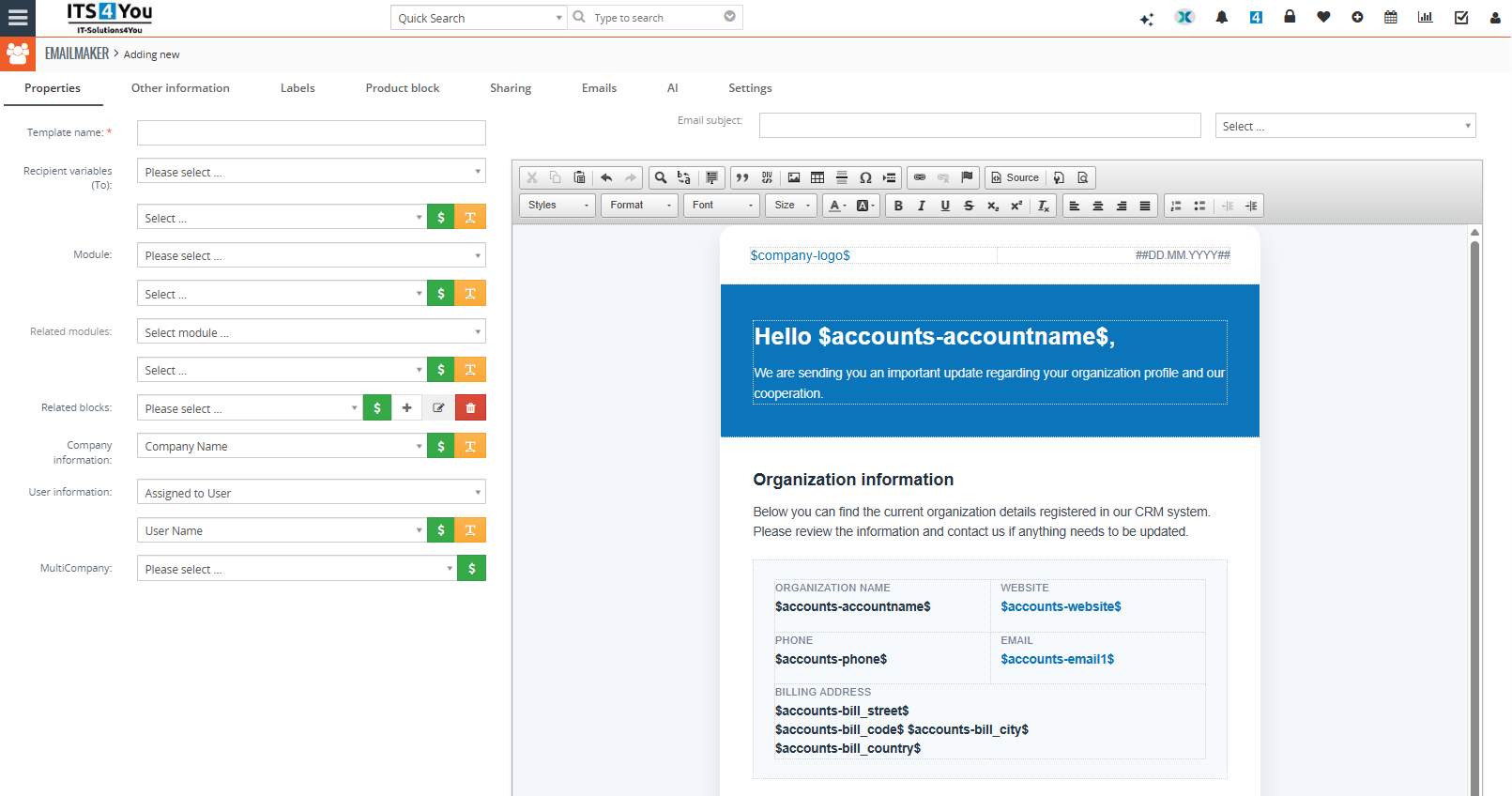
Template Builder shows how administrators can create and edit reusable email templates directly inside Vtiger CRM.
Click the screenshot to open the full size image.
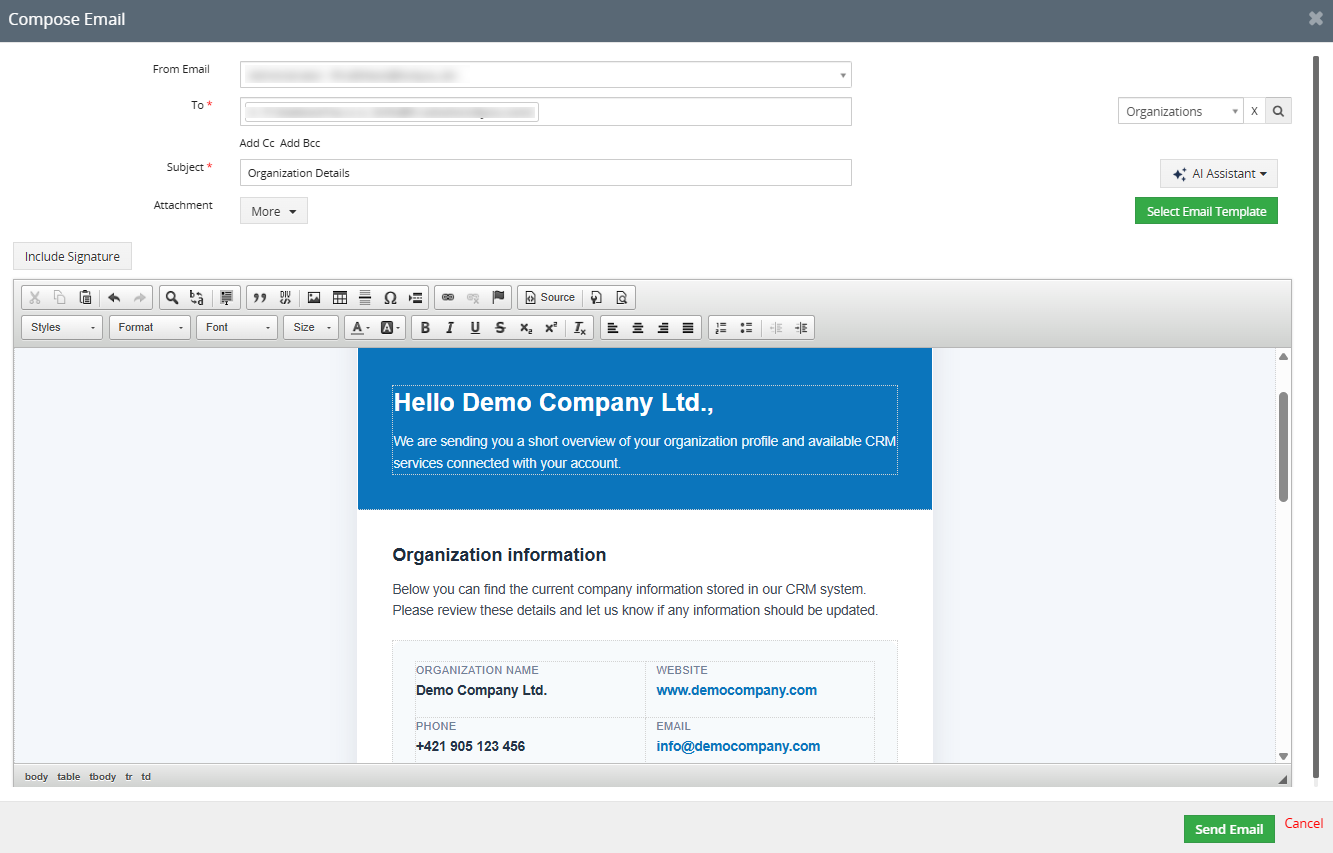
Compose Email shows how selected templates are used when preparing outgoing communication from Vtiger CRM.
Click the screenshot to open the full size image.
Use Email Maker templates in Email Marketing
Email Maker is compatible with our Email Marketing extension. This helps your team reuse prepared Email Maker templates for campaigns and customer communication instead of building the same content again.
- Reuse existing Email Maker templates for campaign content
- Keep sales, support and marketing communication visually consistent
- Save time when preparing newsletters or customer updates
- Use one template workflow for individual emails and broader campaigns
Better template reuse
If your company sends both individual CRM emails and marketing communication, Email Maker can become the central template preparation tool for cleaner and more consistent messages.
Compose better emails with AI in Vtiger CRM
Vtiger AI helps users generate, improve, shorten and translate professional emails directly inside the Vtiger Compose Email window. The user stays in control because the final message is always reviewed before sending.
- Create a complete email from a short instruction
- Improve existing email text before sending
- Shorten long email content for clearer communication
- Translate email content into another language
- Get content suggestions without leaving Vtiger CRM
Requirement for AI email writing
To use AI email writing inside the Compose Email window, the CRM must have Email Maker and at least the lowest AI Chat package active.
Watch AI email composing in Vtiger CRM
See how Vtiger AI helps users prepare better email communication faster directly inside the Compose Email window and streamline your work.
The final email is reviewed and sent by the CRM user, so AI helps with writing while your team keeps control over customer communication.
Default CC and BCC recipients in templates
Starting from Email Maker version 4.65, templates can include default CC and BCC email addresses. When the template is selected, these recipients are loaded automatically into the Compose Email window.
- Add default CC and BCC addresses in the Emails tab
- Reduce repetitive manual recipient entry
- Ensure predefined recipients are used consistently
- Useful for sales managers, support supervisors or archive mailboxes
Prevent emails from being sent with banned words
Email Maker can work with our FREE Emails extension to prevent selected emails from being sent. You can block emails that contain banned words or block sending based on selected templates.
- Block outgoing emails that contain banned words
- Prevent sending based on selected Email Maker templates
- Also supports selected PDF Maker and Email Marketing templates
- Useful for communication quality control and internal rules
Requirement for this feature
This feature was added on November 12, 2024. To use it, install or update our FREE Emails extension to version 0.32 or newer.
Available from the Starter Package
Email Maker is available from the Starter Package and is also included in higher Vtiger extension packages. You can buy it as a single extension or choose a package if you need more tools for your CRM.
Email Maker FAQ
Short answers for Vtiger CRM users comparing email template tools, AI email writing and package options.
What is Email Maker for Vtiger CRM?
Email Maker is a Vtiger CRM extension for creating reusable email templates with CRM fields, related data, formatted content and predefined recipient settings.
Which Vtiger versions are supported?
Email Maker is prepared for Vtiger CRM 7.x and Vtiger CRM 8.x. For older installations, check the documentation and compatibility before purchase.
Can I use fields from CRM records?
Yes. Templates can use fields from source modules, related modules, recipient modules and company information to create personalized outgoing emails.
Can I create unlimited templates?
Yes. Email Maker supports unlimited email templates, so you can create templates for sales, support, service, invoices, quotes and internal communication.
Does Email Maker work with Email Marketing?
Yes. Email Maker is compatible with our Email Marketing extension, where prepared templates can be reused for marketing communication.
Does Email Maker work with Vtiger AI?
Yes. Email Maker can be combined with Vtiger AI to generate, improve, shorten and translate emails directly in the Compose Email window.
What is needed for AI email writing?
You need Email Maker and at least the lowest AI Chat package active in your CRM to use AI email writing features inside Compose Email.
Can default CC and BCC be added automatically?
Yes. Since Email Maker version 4.65, default CC and BCC recipients can be defined inside the email template and loaded automatically after template selection.
Can outgoing emails be blocked?
Yes. With our FREE Emails extension version 0.32 or newer, emails can be blocked if they contain banned words or use selected blocked templates.
Is Email Maker included in packages?
Yes. Email Maker is available from the Starter Package and is included in Mini, Extended and All Access packages.
Have questions or need assistance?
Not sure how to structure your templates, use merge fields, connect Email Maker with Email Marketing or enable AI email writing? Contact us and we will help you choose the right setup.
- Help with email template setup
- Advice for merge fields and related module data
- Support for Email Marketing and AI integration
Very well documented
The manual describes how to install Email Maker, create email templates, use CRM fields, manage template settings and prepare email communication inside Vtiger CRM.
Start using Email Maker for Vtiger CRM
Create professional email templates, reuse CRM data, define default recipients and combine Email Maker with Email Marketing and Vtiger AI for faster customer communication.
Explore all Vtiger extensions
Combine Email Maker with other Vtiger CRM extensions for PDF generation, email marketing, AI assistance, reporting, automation and better CRM productivity.