
 Vtiger CRM
 Defalto CRM
How Sum of Amounts Vtiger Works in List View
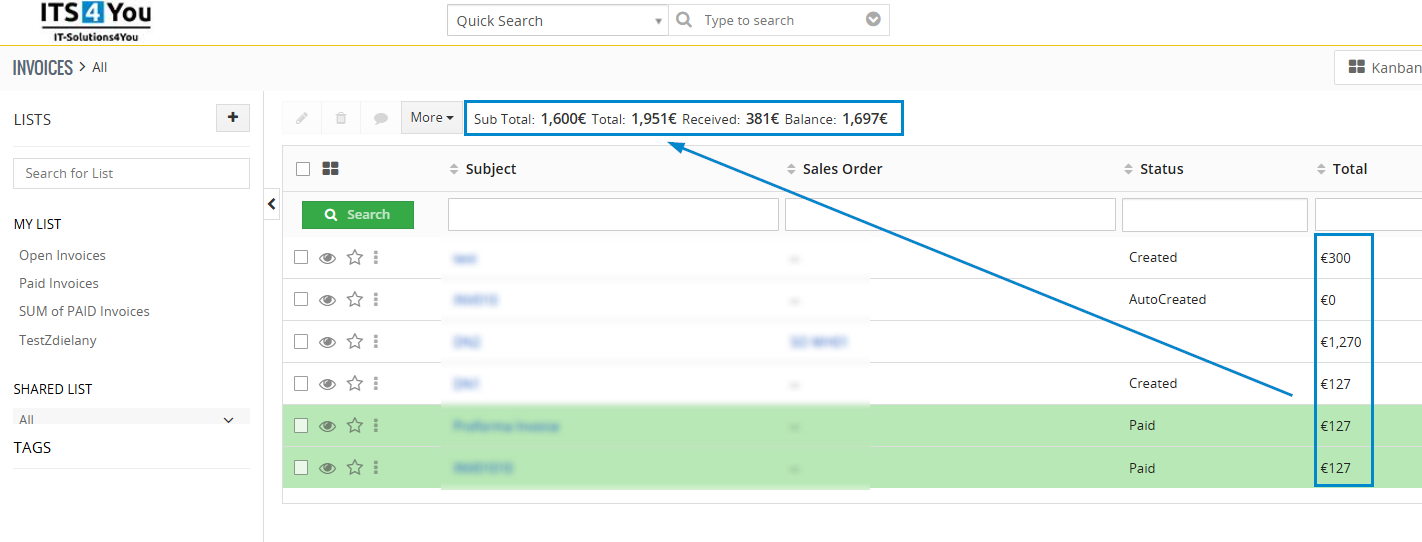
The Sum of Amounts Vtiger extension now allows users to display multiple field summaries directly in the list view. With this update, businesses can calculate totals, balances, and financial overviews in real time inside Vtiger CRM.
With the latest update of Sum of Amounts, users can summarize multiple amount fields directly in the list view. As a result, no exports are required and no spreadsheets are needed. Instead of manual calculations, everything is displayed automatically inside Vtiger CRM.
No spreadsheets.
No manual calculations.
What’s New in This Feature?
Previously, users could summarize only one amount field at a time.
Now you can:
-
Select multiple currency or numeric fields
-
Display their SUM values in the list view footer
-
Automatically recalculate totals based on filters
-
Combine standard and custom fields
For example, in the Invoice module, you can now see:
-
SUM of Total
-
SUM of Subtotal
-
SUM of Balance
-
SUM of Tax
-
SUM of Custom Amount Field
All at once.
Why Multiple Field Summaries Matter
In real business scenarios, decisions are rarely based on a single number. Instead, companies rely on several financial indicators at the same time.
Finance Department
-
Total invoiced
-
Total paid
-
Outstanding balance
Sales Management
-
Expected revenue
-
Weighted revenue
-
Closed-won revenue
Management Reporting
-
Gross revenue
-
Net revenue
-
Discounts
-
Margins
Instead of exporting data to Excel, everything is visible instantly in the CRM list view.
How It Works
Configuration remains simple:
-
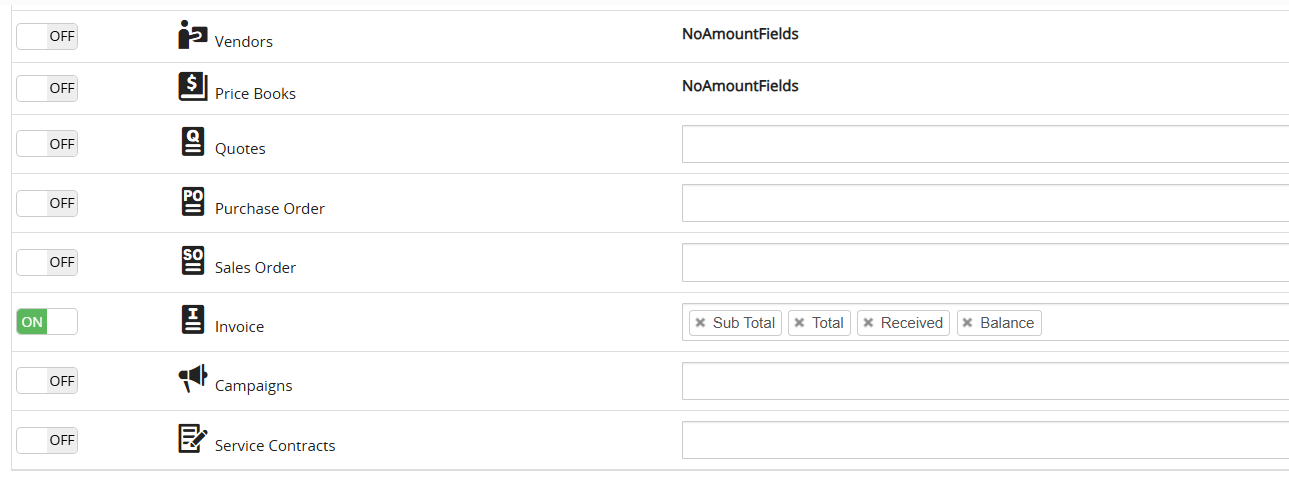
Go to CRM Settings – Other Settings – Sum Amounts
-
Choose an module and Activate it via On/Off button
-
On the right side in the Fields, select the fields which will be calculated as SUM
-
Then open list view — fields are displayed automatically on the top of the list view.
The extension supports currency and numeric fields. In addition, it works seamlessly with custom modules. As a result, totals are recalculated automatically based on applied filters. Most importantly, no coding is required.
Sum of Amounts Vtiger for Invoices, Sales Orders and Custom Modules
For example, imagine filtering invoices by month, salesperson, or paid status. In this case, the list view immediately displays the total invoiced amount, total tax, total paid, and total outstanding balance. All values are dynamically calculated based on the filtered data.
The list view will immediately show:
-
Total invoiced this month
-
Total tax amount
-
Total paid
-
Total outstanding
All dynamically calculated based on the filtered data.
Key Benefits
✔ Multiple field summaries in one view
✔ Real-time recalculation
✔ Works with filters
✔ Compatible with custom fields
✔ Saves time in reporting
✔ No performance-heavy exports
A Small Upgrade That Changes Daily Work
Although it may seem like a small improvement, it significantly enhances financial visibility inside Vtiger CRM. Instead of switching between tools, everything remains inside your CRM environment. As a result, reporting becomes faster and daily work becomes more efficient.
Moreover, the Sum of Amounts Vtiger extension improves daily financial workflows. At the same time, it keeps reporting simple and transparent. Therefore, companies gain better control over their financial data without adding complexity.












Leave a Reply