
A customer calls. You need their latest information, an update on an open quote and a clear reply. How much time do you spend finding the details before the real conversation begins?
At ITS4YOU, we see Vtiger AI as a practical way to make everyday CRM work easier. In this article, we share our view of artificial intelligence, the approach behind our extensions and where we believe it can bring real value to Vtiger Open Source users.
Our view: AI should make daily work easier
A CRM gives your team a shared place for customer details, sales activity and support history. But collecting information is only part of the job. Someone still has to read it, understand what matters and decide what to do next.
We see AI becoming more useful as it moves closer to the work people already do. Writing a draft is a starting point. Helping someone understand a customer record, ask a better question or prepare the next step gives that assistance a clearer business purpose.
Our approach to working with AI is to give it a defined task, provide relevant context and review the result. We believe this is a more useful basis for everyday adoption than expecting a tool to understand an entire business from a single request.
AI is worth considering when the same small tasks keep interrupting your team. Preparing replies, reviewing customer history and organizing information are good examples. The value comes from making those activities easier while leaving people with time for the conversations and decisions that need their attention.
Why we built AI extensions for Vtiger
This practical view shaped our AI extensions. We wanted to bring useful assistance into the CRM environment where people already manage their customers, opportunities and support requests. For the Open Source community, that means adding capabilities to an existing system and building on the information already there.
Our AI Extension for Vtiger CRM adds conversational help to Vtiger Open Source. AI Chat supports record searches, summaries and email drafts. AI Assistant adds reusable configurations for specific team needs.
We believe teams should be able to start with a focused use case and expand when it proves useful. That is why our approach includes both everyday chat and configurable assistants for recurring work.
Four everyday situations where AI can help
To show what we mean, here are four simple examples of the work we design our AI tools to support. Consider which situation feels most familiar to your team.
A reply that gets written sooner
You have the answer to a customer’s question, but turning your notes into a friendly message takes another ten minutes.
“Turn these notes into a short, friendly email. Ask whether the customer would like a product demonstration.”
A first draft gives you something concrete to review. Add the personal detail that matters, check the wording and send it when you are satisfied.
A clearer starting point
A colleague asks you to join a customer meeting at short notice. You need the key points without reading every available record.
“Prepare a short briefing from the available customer information. Highlight what I should check before the meeting.”
The useful outcome is a focused reading list: what is known, what needs checking and which questions you should bring to the conversation.
An easier handover
A support request passes to another colleague. The history is long, and the customer should not have to explain the problem again.
“Summarize the issue, what has already been tried and the information still needed.”
A concise handover can help the next person get oriented. They should still check the original information before suggesting a solution.
A message customers can follow
Your explanation is accurate, but the customer needs a shorter version or a reply in another language.
“Rewrite this message in clear English. Keep the product names and agreed dates unchanged.”
Use the result as an editable draft. Check names, amounts and commitments so that clearer language preserves the original meaning.
Available CRM context and actions depend on the extension level, enabled modules, configuration and user permissions.
Give recurring work its own AI assistant
Once a useful request becomes part of your routine, typing the same instructions every time becomes another repetitive task.
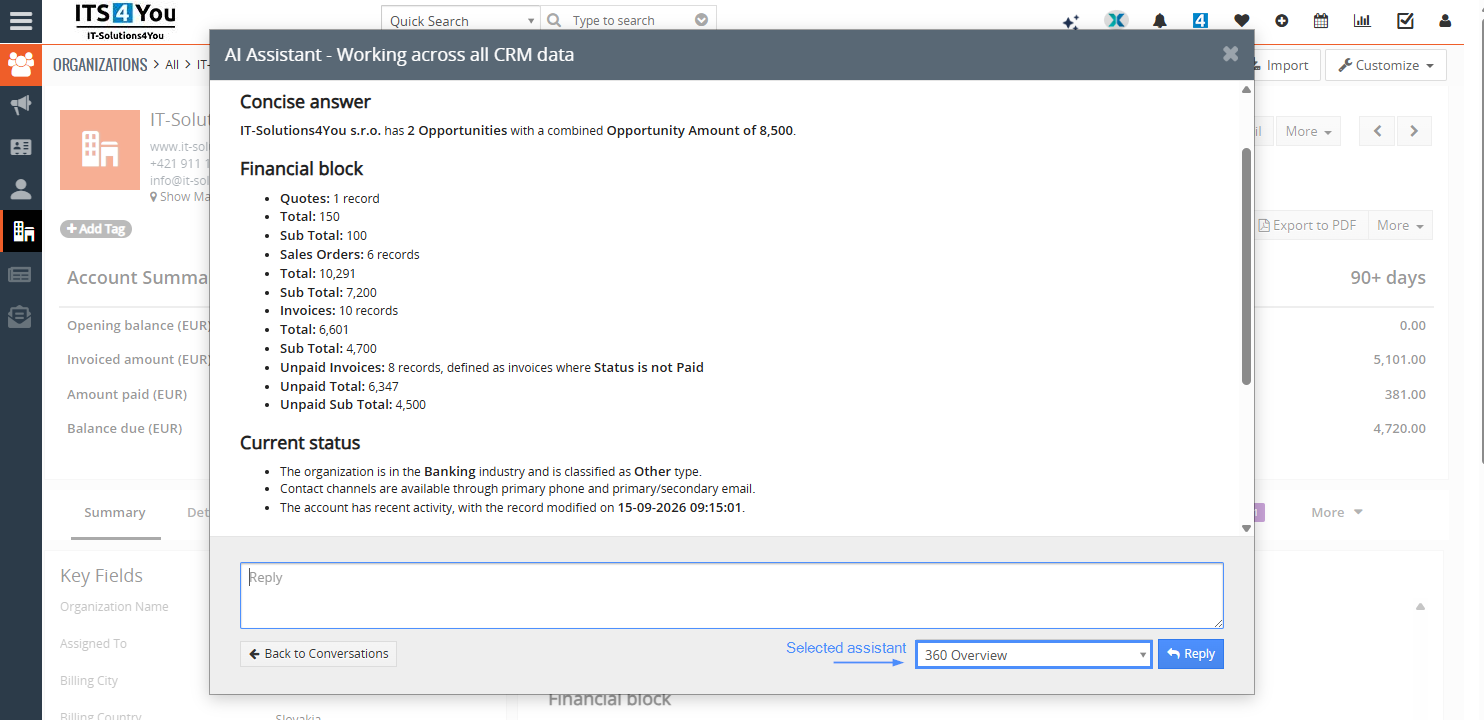
With our AI Assistant for Vtiger CRM , you can save instructions, permitted data and a preferred response format for a module. For example, a customer overview can bring selected organization details and related records into a consistent summary.
Think of a weekly account review. Your team could agree that every briefing should answer three questions: What is happening? What needs attention? What should we discuss next? A shared format makes those briefings easier to compare and use.
Keep people in control of the result
Human review is central to how we approach AI. A fluent answer can still miss an important detail, especially when a customer note is outdated or a date is missing. We want assistance that helps users reach a decision with a clearer understanding of the information available.
In our extension, supported record changes require confirmation. Email drafts are reviewed and sent through the composer. AI Agent, the planned level for broader automation, is still in development.
AI Assistant uses an OpenAI API connection. Selected context is processed externally, and CRM permissions and configured data limits govern what is available. See the assistant features and setup details when planning your rollout.
Start small and look for a useful difference
Choose one activity for your first week, such as preparing customer replies. Ask a few colleagues to try it on suitable examples and record how much editing the drafts need.
Then compare the experience with their usual approach. Did preparation take less time? Were the replies clearer? Did anyone need to correct missing or inaccurate information? These questions tell you more than the number of prompts submitted.
Our recommendation is to keep templates and established processes where they work well. Use AI where wording, context or interpretation varies. For example, an approved email template can provide the structure while an assistant helps prepare a relevant explanation for a particular customer.
As your needs grow, explore our complete collection of Vtiger extensions for documents, reporting, communication and other daily workflows.
Common questions about Vtiger AI
Can I add AI to Vtiger Open Source?
Yes. ITS4YOU provides AI extensions for Vtiger Open Source 7.4, 7.5 and 8.x. Check compatibility with your installation before purchasing.
Is AI included for free?
The Open Source CRM and the AI extension are separate. Check the current AI plans for subscription details and setup requirements.
Should I choose AI Chat or AI Assistant?
Start with AI Chat for everyday requests. Choose AI Assistant when you need reusable module instructions and a consistent output format. AI Chat is included with AI Assistant.
See what could work for your team
Bring one task you would like to make easier. Explore our Vtiger demo, review the AI features and decide where an assistant could fit into your working day.

Leave a Reply